日本語 英語 中国語 韓国語
 
Feature Function Benefit Standard Enterprise
Application Integration Stream data directly to/from applications without staging data to disk Improve system resource efficiency check check
ZIP archives Reduce file size by as much as 95% Reduce costs through the conservation of bandwidth, storage space, and backup tapes check check
Cross-platform data portability ZIP archives are portable data containers that can be read and decompressed on all major enterprise computing platforms Reduce the cost of cross-operating system data transfers and management check check
Large file size support Compress files up to 8 exabytes in size Enable customers to process large files without the need to re-architect their files; meet IT business requirements check check
Very large archive support Over 2 billion files can be included in a ZIP archive Enable customers to simplify the management of file archives; meet IT business requirements check check
Decryption of PKI public-key encrypted ZIP archives Decrypt and extract files that are public-key encrypted by SecureZIP products Decrypt files through an organization-elected method of encryption, including those files protected with public and private keys check check
Self-extracting files for end-users and other platforms ZIP archives can be formatted as self-extracting files for Windows end-users or for UNIX/Linux operating systems; compressed data can be easily unzipped in one easy step (licensed for internal use only) Improve user productivity by using fewer manual steps to access zipped files check check
SMTP integration Distribution of compressed files to end-users simply requires adding a switch and the destination email addresses for the recipients Save processing time and development effort for file distribution to end-users inside or outside the enterprise; improve user productivity by using fewer manual steps to access zipped files check check
FTP integration File transfer can be added to file compression workflows simply by adding a switch to the command string Save processing time and development effort for file backup, archival, and transfer; improve user productivity by requiring fewer steps to distribute archived files and transfer compressed files check check
Automatic file wiping Can be configured to overwrite deleted files, up to seven times, in accordance with NSA specifications Ensure deleted information cannot later be recovered check check
PKZIP for Server

PKZIP for zLinux Enterprise Edition uses several advanced security features that require a product key. Please call our support team at 1-888-475-9273 to request your product key to complete the evaluation download process.

Thank you!

Products » PKZIP » Linux on System z
PKZIP for Linux on System z

Linux on System z 向けデータ圧縮ソフトウェア

コスト削減のために、多くの企業がメインフレーム上の Linux にワークロードを移行しています。PKZIP for Linux on System Z は、LPAR で直接インストールした Linux で、または z/VM 下で起動する Linux でファイルを圧縮します。実績ある ZIP 技術を使用して、企業内外を問わず、対応する OS 間で効果的にデータを移動できる相互運用性を確保します。

使い慣れた、かつ信頼性がある .ZIP 標準に強度なセキュリティ機能を追加したのが SecureZIP です。SecureZIP は、主要なコンピュータ プラットフォームに対応し、対応するプラットフォーム間で、暗号化したデータの交換ができる唯一のデータ セントリック セキュリティ製品です。PKZIP の圧縮機能に強度な暗号化機能の要件が必要な場合、ここをクリックしてください。

Standard Edition

ストレージ コストおよびネットワーク帯域幅を削減 ファイル サイズを最大 95% 圧縮することで、ファイル転送によるネットワーク帯域幅を削減し、バックアップ テープを含むストレージ スペースを節約します。
リソースの生産性を向上 データをディスクへ書き込むことなく、アプリケーションから/へデータを直接ストリーミングすることで、システム リソースの生産性を向上します。
内部や予期せぬ受信者によるデータの窃盗を保護 AES および 3DES 暗号の両方をサポートする強度なパスワード暗号で暗号化した機密情報を解凍します。
クロスプラットフォームの対応 Windows Desktop、Windows および UNIX/Linux サーバー、IBM i、および IBM zSeries を含むすべての主要なエンタープライズ OS 間で圧縮/暗号したファイルの交換が可能です。
有人/無人操作のエラー レポート 主要なデータ センター マネージメント アプリケーションと SNMP (Simplified Network Message Protocol) の統合でエラーをレポートします。

Enterprise Edition

PKZIP for Linux on System Z Standard Edition のすべての機能に加え、以下の特長があります。
SFX (自己解凍) ファイルの作成機能 専用のアプリケーションをインストールしなくても Windows Desktop で開くことができる自己解凍 ZIP アーカイブ (SFX) を作成します。
FTP と SMTP の統合 ファイルの自動配信を提供します (サーバーからデスクトップへ自動的にファイルを配布)。
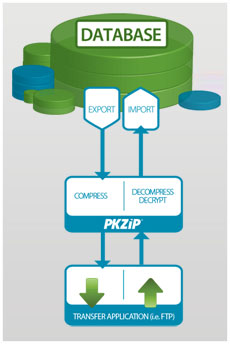
アプリケーション統合

  • PKZIP for Server
  • アプリケーション統合でセキュリティと処理効率を改良し、データを直接アプリケーションの中と外へストリーム処理します。 暗号化したデータは、復号化したデータをディスクへ書き込まずに処理できます。処理後、データをストリーム処理し、ディスクへ書き込みをせずに暗号化ファイルへ戻すことができます。