日本語 英語 中国語 韓国語
 
PKZIP Standard Enterprise
  • Application Integration
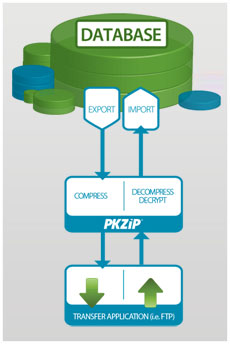
    • Stream data directly to/from applications without staging data to disk.
check check
  • ZIP archives that reduce file size by as much as 95%
    • Get bottom-line cost reductions through conservation of bandwidth, storage space, and backup tapes.
check check
  • Cross-platform data portability
    • ZIP archives are portable data containers that can be read and decompressed on virtually all major enterprise operating systems. PKWARE® is the only single-source vendor of ZIP compression products across the major enterprise operating systems, guaranteeing interoperability.
check check
  • ZIP compression from the creator of the .ZIP file format
    • PKWARE, the original developer of the ZIP compression format, has made ZIP specifications freely available to the public as a standard for compressed data storage. This has made .ZIP one of the most widely used file formats in the world.
check check
  • Large file size support
    • PKZIP can compress files up to 9 exabytes in size.
check check
  • Very large archive support
    • Over 2 billion files can be included in a ZIP archive.
check check
  • Error reporting for both attended and unattended operations
    • Windows: PKZIP reports errors either to the standard Windows® Event Log, or through SNMP (Simplified Network Message Protocol) integration with leading data center management applications.

      UNIX: PKZIP reports errors either to the standard Syslog, or through SNMP (Simplified Network Message Protocol) integration with leading data center management applications.
check check
  • Strong passphrase-based AES and 3DES data file protection (Windows only)
    • PKZIP for Server supports AES or 3DES encryption using passphrases to protect valuable information. Files encrypted with PKZIP may be decrypted and extracted on major enterprise computing platforms using PKZIP, SecureZIP®, or the free ZIP Reader for Windows.
check check
  • Decryption of PKI public-key encrypted ZIP archives
    • PKZIP users can decrypt and extract files that are public-key encrypted by SecureZIP products.
no check
  • Self-extracting files for end-users and other platforms
    • ZIP archives can be formatted as self-extracting files for Windows end-users or for UNIX®/Linux® operating systems, so that compressed data can be easily unzipped in one easy step. (Licensed for internal use only)
check check
  • SMTP integration
    • Distribution of compressed files to end-users simply requires adding a switch and the destination email addresses for the recipients, saving processing time and development effort for file distribution to end-users inside or outside the enterprise.
check check
  • FTP integration
    • File transfer can be added to file compression workflows simply by adding a switch to the command string, saving processing time and development effort for file backup, archival, and transfer.
check check
Note: SecureZIP (PKZIP) Server for Windows is available in Enterprise Edition only. All the enterprise features listed here are included with the product.
PKZIP for Server

PKZIP for Server Enterprise Edition uses several advanced security features that require a product key. Please call our support team at 1-888-475-9273 to request your product key to complete the evaluation download process.

Thank you!

Products » PKZIP » server
PKZIP® for Server

サーバー向けデータ圧縮ソフトウェア


OpenPGP 対応 PKZIP for Server v14 リリース!
v14 のリリース情報は、こちら (Windows 版Unix/Linix 版) を参照してください。

PKZIP は、UNIX/Linux/Windows Server 向けの有力でかつベストな ZIP 製品です。最大 95% ファイルを圧縮し、ファイル転送時間、ストレージのスペースおよびアーカイブ処理を大幅に節約します。PKWARE 社は、約 20 年前に ZIP 形式を発案し、エンタープライズ間およびエンタープライズの枠を超えて、信頼できるデータ転送の標準となってきました。PKZIP は、すべての主要なエンタープライズ コンピューティング プラットフォームに対応してるので、ZIP ファイルの受信者は、ZIP ファイルを開くことができるので、 IT マネージャにとって、PKZIP は非常に貴重なツールです。

PKZIP Server では、強力なコマンドラインインターフェースを提供してるので、サーバー上でファイルの圧縮 / 解凍などの処理をバッチやスクリプト化して自動化したり、既存のアプリケーションに容易に組み込むことができます。コード例はここをクリックしてください。

使い慣れた、かつ信頼性がある .ZIP 標準に強度なセキュリティ機能を追加したのが SecureZIP です。SecureZIP は、主要なコンピュータ プラットフォームに対応し、対応するプラットフォーム間で、暗号化したデータの交換ができる唯一のデータ セントリック セキュリティ製品です。PKZIP の圧縮機能に強度な暗号化機能の要件が必要な場合、ここをクリックしてください。

Enterprise Edition

PKZIP Server Standard Edition のすべての機能に加え、以下の特長があります。
SFX (自己解凍) ファイルの作成機能 Windows デスクトップに余計なソフトウェアをインストールせずに解凍可能な SFX (自己解凍) ファイルを作成できます。

注意: SFX (自己解凍) ファイルの作成機能は、社内使用に限られています。生成した SFX ファイルを商用で社外へ配布する場合には、別途、SFX 配布ライセンスが必要です。
FTP & SMTP 統合 ファイルの自動配布機能を提供 (サーバーからデスクトップへ自動的にファイルを配布)
注意: PKZIP Server for Windows は、Enterprise Edition のみとなります。Standard Edition は提供しておりません。

Standard Edition

ファイルを圧縮して、ネットワーク帯域幅とストレージ スペースを節約 ファイル サイズを最大 95% 圧縮し、バックアップ テープを含むストレージ スペースやネットワーク帯域幅を節約します。
処理効率を改良 セキュリティと処理効率を改良し、データをディスクへ書き込まずに、直接アプリケーションの中と外へストリーム処理します。
強度なパスワード ベースのファイル保護 AES と 3DES の強度な暗号化のサポートで、機密情報を保護します。PKZIP で暗号化したファイルは、対応するすべてのコンピュータ プラットフォームで復号が可能です。
主要なエンタープライズ向けのすべての OS 間でデータ交換が可能 Windows® Desktop、Windows および UNIX®/Linux® サーバー、IBM i® および IBM zSeries® を含む主要なエンタープライズ向けのすべての OS 間で圧縮および暗号化したデータの交換が可能です。
エラー レポート 標準 Windows Event Log へ、または主要なデータ センタ管理アプリケーションと統合する SNMP (Simplified Network Message Protocol) を使用して、エラーをレポートします。

アプリケーション統合

  • PKZIP for Server
  • アプリケーション統合でセキュリティと処理効率を改良し、データを直接アプリケーションの中と外へストリーム処理します。 暗号化したデータは、復号化したデータをディスクへ書き込まずに処理できます。処理後、データをストリーム処理し、ディスクへ書き込みをせずに暗号化ファイルへ戻すことができます。