日本語 英語 中国語 韓国語
 
PKZIP Standard Enterprise
  • ZIP archives that reduce file size by as much as 95%
    • Experience bottom-line cost reductions from conservation of bandwidth, storage space, and backup tapes.
check check
  • Large file size support
    • PKZIP can compress files of over 9 exabytes in size.
check check
  • Very large archive support
    • Over 2 billion files can be included in a single ZIP archive.
check check
  • Strong password-based data file protection
    • PKZIP supports AES or 3DES encryption to protect valuable information. Files encrypted with PKZIP may be decrypted and extracted on major enterprise computing platforms using PKZIP or SecureZIP®.
check check
  • Decryption of PKI public-key encrypted ZIP archives
    • PKZIP users can decrypt and extract files encrypted with a PKI public key by SecureZIP products.
check check
  • Authentication of digitally signed archives and files
    • Recipients of digitally signed files can validate the signature to ensure the sender is who he or she claims to be, and verify that files have not been altered or tampered with since signed.
check check
  • Command-line add-on for automating recurring tasks
    • PKZIP provides a command-line interface allowing users to create scripts for automating unattended script and batch processing.
check check
  • Microsoft Office® Integration
    • Save secure documents directly from Microsoft Office (Word®, Excel®, and PowerPoint®).
check check
  • Custom alternative extensions for mailed .ZIP archives
    • Avoid ZIP archives being blocked by eMail configurations, by creating a custom extension for your .ZIP archives.
check check
  • Seamless integration with Microsoft Outlook®
    • Compressing data is as easy as attaching files to email with PKZIP Outlook integration, making user training virtually unnecessary.
check check
  • Configurable minimum passphrase length and complexity
    • Good passphrases are essential to maintaining the security of your data - the longer the passphrase, the more secure it is. PKZIP allows administrators to configure the minimum length of passphrases created by users.
check check
  • Certificate revocation list checking
    • PKZIP can check the validity of digital certificates used to encrypt or digitally sign files against a Certificate Revocation List (CRL). When a PKZIP user receives a file that was signed or encrypted using SecureZIP, CRL checking will show a certificate that has been revoked as invalid.
check check
  • LZMA and PPMd Support
    • LZMA and PPMd are increasingly popular general purpose algorithms which can provide increased compression. PPMd support available on 32-bit version only.
no check
  • Easy-to-use interfaces
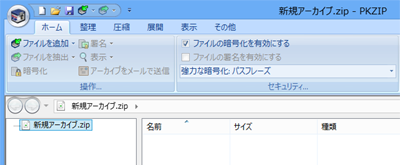
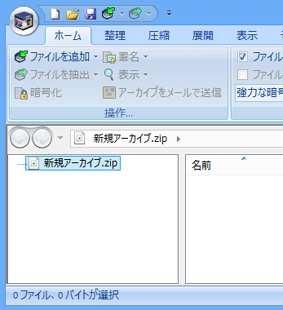
    • SecureZIP makes data protection incredibly easy. Signing and encrypting files are single-click operations. Choose from conventional menu-style, or fluent, ribbon-style interfaces.
no check
  • Administrative lockdown of end-user options
    • PKZIP is the only ZIP utility with a Policy Manager to lock configuration options, so that compression practices can be enforced for individuals or departments - delivering considerable bottom-line savings from consistent, company-wide data compression.
no check
Products » PKZIP » Windows
Products PKZIP Desktop
PKZIP for Windows Desktop

ファイル圧縮ソフトウェア

OpenPGP 対応 PKZIP for Windows Desktop v14 リリース!
v14 のリリース情報は、こちらを参照してください。

PKZIP を使用して、データを圧縮することによって、ハード ドライブに保存できる情報量を大幅に増やし、email によるファイル転送時間を大幅に短縮します。 PKZIP (高度な圧縮ソフトウェア) は、最大 95% ファイル サイズを圧縮し、ハードウェアの追加やアップグレードなどを行わずに、 コスト削減が可能です。

PKZIP の最新バージョンには、Microsoft Management Console のユーザー設定の権限をコントロールする機能が含まれます。これによって、今まで以上に簡単に、組織内のすべてのデスクトップでのファイル圧縮作業において、最大限の利益を確保します。

使い慣れた、かつ信頼性がある .ZIP 標準に強度なセキュリティ機能を追加したのが SecureZIP です。SecureZIP は、主要なコンピュータ プラットフォームに対応し、対応するプラットフォーム間で、暗号化したデータの交換ができる唯一のデータ セントリック セキュリティ製品です。PKZIP の圧縮機能に強度な暗号化機能の要件が必要な場合、ここをクリックしてください。

Standard Edition

ファイルを圧縮して、ストレージ スペースを節約 ファイル サイズを最大 95% 圧縮し、貴重なストレージ スペースを節約し、ファイル転送を容易にします。
Word、Excel または PowerPoint から直接ファイルを圧縮および暗号化 Microsoft Office を使用する際に、単純にメニューから "Save Copy as ZIP File" または "Save Copy as Secure ZIP File" を選択するだけで、Word、Excel または PowerPoint から直接ファイルを圧縮および暗号化できます。
強度なパスワード ベースのファイル保護 AES や 3DES の強度な暗号化のサポートで機密情報を保護します。PKZIP で暗号化したファイルは、対応するすべてのコンピュータ プラットフォームで復号が可能です。
セキュアな Email と添付ファイルを送信 Microsoft Outlook との統合で、Email や添付ファイルを自動的に暗号化して送付するように設定が可能です。暗号化した email はダウンロードしたり再保存することなく転送が可能です。
主要なエンタープライズ向けのすべての OS 間でデータ交換が可能 Windows® Desktop、Windows および UNIX®/Linux® サーバー、IBM iSeries® および IBM zSeries® を含む主要なエンタープライズ向けのすべての OS 間で圧縮および暗号化したデータの交換が可能です。
大きいサイズのファイルと大きいアーカイブのサポート PKZIP は、9 エクサバイトを超えるサイズのファイルを圧縮できます。一つの ZIP アーカイブに 20 億個を超えるファイルを圧縮できます。実際には無制限ですが、多くの場合、制限は OS のファイル システムに依存します。
ファイル名の暗号化 暗号化した PKZIP のアーカイブを復号するまでアーカイブ内のファイル名を読むことはできません。
パスワード長の最小値を変更可能 管理者によって、 パスワード長の最小値を設定することができます。
ロスレス圧縮 (可逆圧縮) PKZIP はロスレス圧縮を使用しているので、ファイルを ZIP する際に、オリジナル データの欠落がありません。
多くの圧縮・解凍方式に対応 ZIP、TAR、JAR、BZIP2、GZIP、UUEncode、LZMA、PPMd、XXEncode、OpenPGP、TAR BZIP2 および TAR GZIP を含む複数の圧縮方式を作成可能です。
ZIP、RAR、TAR、JAR、BZIP2、GZIP、UUEncode、XXEncode、CAB、LZH、ARJ、LZMA、PPMd、BinHex、OpenPGP、TAR BZIP2、TAR GZIP、7Zip、CDR、compress (UNIX、LZW)、IMG および ISO の圧縮方式を解凍可能です。
注意: PPMd および LZMA ファイル フォーマットは v12.4 以降でサポートしています。
OpenPGP、7Zip ファイル フォーマットは v14 以降でサポートしています。
アドオンのコマンドラインでタスクの自動化 PKZIP では、アドオンでコマンドライン インターフェースも提供し、スクリプトやバッチで処理を自動化することができます。
ファイルの自動削除 削除したファイルを上書きするように設定することができます - NSA 仕様では、7 回まで - 削除した情報を後で復元できないようにするため。

Enterprise Edition

PKZIP for Windows Standard Edition のすべての機能に加え、以下の特長があります。
一貫した圧縮およびパスワード セキュリティ ポリシーを設定MMC (Microsoft Management Console) スナップ インで Policy Manager を使用して、管理者は、組織の要件や運用に応じて、圧縮および暗号化ポリシーを強制することができます。
複雑なパスワードのルールを設定 パスワード長、小文字と大文字の数、数字、記号などをパスワードに含めるように設定することで、複雑なパスワードを設定可能です。

PKZIP in Action


使いやすいインターフェース
ZIP コンテナにファイルをドラッグ アンド ドロップするだけで貴重なストレージ スペースを節約できます。