日本語 英語 中国語 韓国語
 
Feature Function Benefit Standard Enterprise
Zip archives Reduces file size by as much as 98% Reduce costs through the conservation of network bandwidth, storage space, and backup tapes check check
Hardware-accelerated encryption Encrypt files using System z hardware Improve workload throughput by using less CPU overhead to perform file encryption check check
Hardware- accelerated compression Compresses files using System z hardware Improve workload throughput by using less CPU overhead to perform file compression check check
Customize static dictionaries Enables better compression ratios by tailoring static dictionaries to your business data Experience greater storage savings and smaller files spanning your network check check
Support for IBM® Protected Key processing Blends the performance profile of clear key encryption with the superior private key protection of secure key Improve workload efficiency by using less CPU to encrypt files with z/OS cryptographic processors check check
Strong password-based data file protection SecureZIP supports AES or 3DES encryption to protect valuable information. Files encrypted with SecureZIP may be decrypted and extracted on major enterprise computing platforms using PKZIP or SecureZIP check check
Encryption via passphrases, digital certificates, or both SecureZIP accommodates those who have PKI and those that don't by enabling encryption and decryption via passphrases, public key/private key pairs, or both at the same time depending on the access requirements of each intended recipient. Recipients can then decrypt files by presenting the correct passphrase or private key.

SecureZIP supports X.509 RSA® v3 certificates issued from recognized certificate authorities such as Comodo®, VeriSign®, Entrust®, and Microsoft®.
Maintain control of data by encrypting and decrypting files through business-selected method of encryption, including those files protected with public/ private keys check check
Digital signatures Enables users to sign files with their unique digital certificates Validate the signature of signed files to ensure the sender is who they claim to be and verify that the document has not been altered or tampered with since signing (may also offer non-repudiation, tracking the signature to the creator) check check
Secure private key store Includes a secure private key store that is compliant with mainframe security servers RACF®, ACF2®, and Top Secret® Simplify management of resources by using your security server as a central point of distribution for public and private keys check check
Automatic access to public keys in directories Offers an optional interface that integrates with Lightweight Directory Access Protocol (LDAP) compliant directories, such as Sun® iPlanet, Novell NetWare®, and Microsoft Active Directory® Locate, retrieve, and apply public keys for certificate-based encryption and decryption with ease check check
SAF enhanced key stores Protects private keys used for signing & decryption

Supports the management of using private keys in IBM’s SAF-controlled ICSF CKDS (Cryptographic Key Data Set)
Improve key management by sharing keys across multiple enterprise applications from an industry standard key store check check
SAF Secured Passphrase Management Isolates passphrase management from job execution Improve operational security with the elimination of exposed passphrases check check
Hardened policy lockdown Establishes security controls strictly enforced using SAF

Separates resource control from product installation and job execution
Enforce security policy to protect against configuration changes, access to product functions and issuing commands

Provide auditable logging of changes
check check
FIPS 140-2 mode Operates using only FIPS 140-2 validated cryptographic modules Meet compliance standards for encryption mandated by most Federal government agencies check check
File name encryption Masks file name, file size, and other information to further protect data if it is intercepted in transit or improperly accessed Protect data from unintended recipients and internal theft by encrypting information about the file and the meta data defining its contents check check
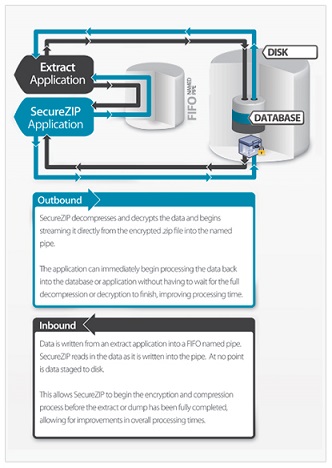
Application Integration Streams data directly to/from applications without staging data to disk Improve system resource efficiency check check
System Integration Provides direct access to read or write files on Windows® or UNIX® servers by the z/OS® operating environment Reduce total elapsed processing time by decreasing the number of steps needed to create and extract archives check check
Contingency Key Ensures organizations are always able to quickly and easily access documents encrypted by their employees Reduce/eliminate risk associated with improperly used encryption (e.g., insider theft) Ensure data is immediately available in the case of a critical audit check check
ISPF panel integration Integrates with IBM’s Interactive System Productivity Facility (ISPF) allowing operators and systems programmers to initiate actions ad hoc, using 3270 screen menus and displays Simplify product configuration updates and use of product functions through an interface most commonly used by systems programmers and operators check check
Large file size support Compresses files up to 8 exabytes in size Meet IT business requirements by enabling customers to process large files without the need to re-architect their files and applications check check
Enhanced tape processing Reduces the time needed to write files to, and extract files from, tape media; files are written directly to tape media, bypassing the need to stage them to disk first

Quickly finds files in larger ZIP archives held on tape
Improve user and staff productivity by reducing the number of steps and amount of time required to access data check check
Products » SecureZIP » z/OS
SecureZIP® for z/OS®

メインフレーム向け暗号化ソフトウェア

SecureZIP for z/OS は、ZIP の容易な運用に強度なセキュリティを統合し、企業内外でセンシティブな情報を保護します。

データ センターで、SecureZIP for z/OS を使用して、データセットを保護し、EBCDIC から ASCII への自動変換で、メインフレームから IBM ミッドレンジ、UNIX、Linux、Windows サーバーおよび Windows デスクトップ間でシームレスにセキュアなファイル転送を実現できます。
SecureZIP for z/OS には、クリティカルな操作を迅速にするためのデータ センター向けのタイム セービング機能が含まれます。

Standard Edition

主要なエンタープライズ向けのすべての OS 間でデータ交換が可能主要なエンタープライズ向けのすべての OS 間でデータ交換が可能Windows® Desktop、Windows および UNIX®/Linux® サーバー、IBM i® および IBM zSeries® を含む主要なエンタープライズ向けのすべての OS 間で圧縮および暗号化したデータの交換が可能です。
FIPS 140 準拠の暗号化FIPS 140-2 準拠の暗号化ライブラリを使用して、コンプライアンスに対応。
拡張テープ処理テープ メディアへのファイルの書き込みとテープ メディアからのファイルの展開に必要な時間を大幅に短縮します。ファイルを最初にディスクへ確保せずに、ファイルを直接テープ メディアへ書き込みます。
自己解凍形式の ZIP アーカイブ (SFX) の作成自己解凍形式の ZIP アーカイブ (SFX) を作成して、Windows デスクトップでソフトウェアをインストールせずにファイルを開くことができます。
システム統合z/OSR 環境で、Windows または UNIX サーバー上の ZIP アーカイブ ファイルを読み書きするダイレクト アクセスを提供します。
ICSF 統合ICSF (IBM Cryptographic Services Facility) を利用して、短時間でセンシティブなデータを保護し、一方で、ZIP 標準が持つクロス プラットフォームのデータ互換性を確保します。
最大 95% ファイル サイズを縮小ZIP 圧縮で最大 95% ファイル サイズを縮小し、処理速度を短縮し、貴重なリソースを節約します。
IBM Protected Key 処理のサポートクリア鍵暗号のパフォーマンス プロファイルとセキュア鍵の優れた秘密鍵保護を融合します。

Enterprise Edition

SecureZIP for z/OS Standard Edition のすべての機能に加え、以下の特長があります。
証明書ベースの暗号化X.509 デジタル証明書を使用してデータを暗号化; デジタル署名のサポートを活用します。
アプリケーション統合データをディスクに保存せずにアプリケーションから、またはアプリケーションへデータを直接ストリーム処理します。
データ コントロールマスター キー機能で、管理者はメインフレーム環境内で処理したデータにアクセスできます。
SAF Enhanced Key Stores
  • 保護を署名 & 復号に使用、および Security Server Key Rings に配置した Private Key の保護。
  • IBM の SAF-controlled ICSF CKDS (Cryptographic Key Data Set) の Private Key の管理と使用をサポート。
  • 鍵の管理を改良 - 業界標準のキー ストアから複数のエンタープライズ アプリケーションで鍵を共有。
SAF-Secured Passphrase Management
  • 攻撃を受けた暗号パスワードを排除して、操作上のセキュリティを改良。
  • インストールした暗号コプロセッサでサポートするアルゴリズム用に SecureKey を操作。
  • Job の実行とは別にパスワードを管理。
Hardened Policy Lockdown
  • SAF を使用して厳格なセキュリティ コントロールを確立。
  • 製品のインストールと Job の実行でリソース コントロールを分離。
  • 暗号化したデータの復元および管理のためにマスター キー (Contingency Key) 処理の SAF を施行。
  • Security audit trail with SMF (System Management Facility) レコードでセキュリティ監査を試行。

How it Works: アプリケーション統合

アプリケーション統合 SecureZIP for z/OS のアプリケーション統合で、データをディスクに保存せずにアプリケーションから、またはアプリケーションへセンシティブなデータを直接処理します。アプリケーションが処理を終了すると、暗号化のためにデータを SecureZIP へストリームします - 繰り返しになりますが、保護されていないデータはディスクに保存されません。

他の多くの Job 処理は、SecureZIP のアプリケーション統合と異なり、必要に応じて、アプリケーションがアクセスできるようにデータを復号して保存し、保護されていない状態になる場合があります。データ処理が終了すると、アプリケーションは再度データをディスクに保存し、保護されていない状態のままになります。

クリックして、アプリケーション統合の動作を確認してください »