|
KudanAR - iOS
|
|
KudanAR - iOS
|
#import <ARCameraStream.h>
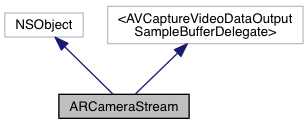
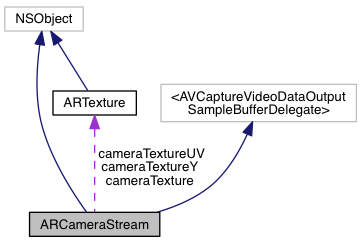
 Inheritance diagram for ARCameraStream: Collaboration diagram for ARCameraStream:
Instance Methods | |
| (ARColour *) | - averageColourFromData:withChannels:downsamplingWidth:height: |
| (void) | - initialise |
| (void) | - deinitialise |
| (void) | - start |
| (void) | - stop |
| (void) | - addDelegate: |
| (void) | - removeDelegate: |
| (void) | - removeDelegates |
Class Methods | |
| (ARCameraStream *) | + getInstance |
Properties | |
| float | width |
| float | height |
| float | padding |
| ARTexture * | cameraTexture |
| NSArray * | delegates |
| ARTexture * | cameraTextureY |
| ARTexture * | cameraTextureUV |
A manager class for handling the camera stream.
| - (void) addDelegate: | (id< ARCameraStreamEvent >) | delegate |
| delegate | The delegate to add. Add a delegate for camera update event notifications. |
| - (ARColour *) averageColourFromData: | (NSData *) | data | |
| withChannels: | (int) | channels | |
| downsamplingWidth: | (int) | width | |
| height: | (int) | height | |
Returns the average colour of an image expressed as a byte array. The image will be downsized before computation of the average. Smaller images will compute faster at the expense of accuracy. It is recommended to reduce image size as much as possible.
Example of use:
By using similar code with the didReceiveNewFrame event, it is possible to get the average colour of each frame as it becomes available.
| data | NSData object containing the image data. |
| channels | The number of channels contained within the image data. For example, RGB data would contain 3 channels. |
| width | The width, in pixels, to which the image will be scaled before computing the average. |
| height | The height, in pixels, to which the image will be scaled before computing the average. |
| - (void) deinitialise |
Deinitialise the camera. This is usually handled automatically.
Example of use:
| + (ARCameraStream *) getInstance |
Gets the instance of the camera stream singleton.
Example of use:
| - (void) initialise |
Initialise the camera. This is usually handled automatically.
Example of use:
| - (void) removeDelegate: | (id< ARCameraStreamEvent >) | delegate |
| delegate | The delegate to remove. Remove a delegate from camera update event notifications. |
| - (void) removeDelegates |
Removes all ARCameraStreamEvent delegates currently associated with this singleton.
| - (void) start |
Start the camera stream. This is usually handled automatically.
Example of use:
| - (void) stop |
Stop the camera stream. This is usually handled automatically.
Example of use:
|
readwritenonatomicassign |
The camera texture.
|
readwritenonatomicassign |
Camera chroma texture.
|
readwritenonatomicassign |
Camera luma texture.
|
readwritenonatomicassign |
Array containing all ARCameraStreamEvent delegates that have been added to this singleton.
|
readwritenonatomicassign |
The height of the camera image, in pixels.
|
readwritenonatomicassign |
The padding of the camera image in pixels.
|
readwritenonatomicassign |
The width of the camera image, in pixels.
 1.8.11