


We are known for our award-winning solutions, and we continue to strive for excellence with applications designed by IT pros, for IT pros.

VoIP & Network Quality Manager Proactive VoIP QoS Management & WAN Performance Monitoring
- Monitors Cisco® & Avaya VoIP Quality of Service call metrics including jitter, latency, packet loss, and MOS
- Correlates call quality issues with WAN performance for advanced troubleshooting
- Searches & filters call detail records
- Monitors site-to-site WAN performance using Cisco® IP SLA technology
- Automatically discovers Cisco® IP SLA enabled network devices & typically deploys in less than an hour
Guided Tour
Tired of end user complaints about VoIP call quality? Watch how SolarWinds’ VoIP QoS software monitors and correlates key WAN and VoIP performance metrics for advanced troubleshooting. Monitor and alert on VoIP
jitter, latency, packet
loss, MOS and more.

無料評価版 ダウンロード
30 日間 フル機能を用可能
VoIP QoS Management with SolarWinds VoIP & Network Quality Manager
SolarWinds VoIP & Network Quality Manager gives you at-a-glance insight into all aspects of WAN and VoIP performance by providing the ability to search and filter your call detail records (CDRs) and call management records. Download a free trial and get a global snapshot of your IP SLA operations in less than an hour.
Everyday Problems Solved
Top 6 Reasons to Use SolarWinds’ VoIP Monitoring Software
-
Quick, Do-it-Yourself Deployment
Download, install and deploy VoIP & Network Quality Manager in less than an hour using three simple steps.
- DIY Deployment gets you up and running in less than an hour
- Simple wizard interface
- Automatic device discovery including identification of IP SLA capable devices
Deploying SolarWinds VoIP and Network Quality Manager (VNQM) is a simple three-step process. First, install and configure VoIP and Network Quality Manager using a simple wizard interface. Next, let VoIP and Network Quality Manager automatically discover your VoIP and IP SLA capable devices. Finally, begin monitoring your VoIP and WAN performance. You’ll be monitoring in less than an hour.
Even better, with VoIP and Network Quality Manager’s intuitive web interface, you won’t need to attend training classes, read books with large animals on the cover, or pour through manuals in order to become productive.
Learn More about Deployment » -
Intelligent WAN & VoIP Quality of Service Alerts
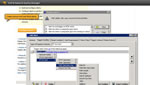
Configure intelligent alerts that notify you when specific WAN or VoIP performance thresholds are crossed so you are the first to know when an issue arises with SolarWinds’ WAN and VoIP monitoring Software.
- Configure VoIP performance alerts to notify you when key VoIP metrics such as jitter, latency, packet loss or MOS exceed your defined thresholds
- Configure IP SLA alerts to notify you when specific WAN performance thresholds are crossed
VoIP & Network Quality Manager enables you to quickly and easily configure intelligent alerts for correlated events, sustained conditions, and complex combinations of network and call states. You’ll know immediately if thresholds are violated by using triggers to notify you when jitter or delay levels are reaching a point that threatens voice quality.
VoIP and Network Quality Manager includes more than 16 built-in alert delivery methods and responses including email, pages, SNMP traps, text-to-speech, syslog messages, external application launching and automated escalation alerts.
Learn More about WAN and VoIP Performance Alerts » -
Monitor VoIP Call Quality
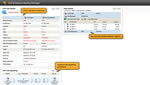
SolarWinds VoIP & Network Quality Manager monitors VoIP call quality by analyzing call detail records (CDRs) generated by Cisco & Avaya® CallManager.
- Monitor key call performance metrics including: jitter, latency, packet loss and MOS
- Generate real-time alerts when critical call performance thresholds are exceeded
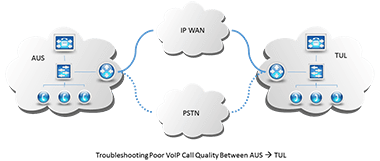
- Correlate actual call performance metrics with corresponding IP SLA operations to troubleshoot poor call quality and WAN performance
- Track and confirm that your service provider meets the requirements of your WAN service level agreement
What is causing garbled words on the IP phones? How do you know if your MOS is falling below the average score of 3.5? VoIP & Network Quality Manager monitors the call performance metrics found within the CDR of every VoIP call to help you keep a sharp eye on your VoIP network health and maintain voice quality efficiencies.
Learn More about VoIP Monitoring » -
Search & Filter Call Detail Records
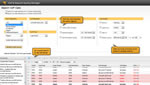
Our VoIP QoS software provides the ability to search, filter and display call detail records (CDRs) to aid in troubleshooting.
- Search and filter on call origination or destination (phone number, IP address, region and gateway/endpoint) or Call Manager
- Search and filter based on time of call
- Search and filter on call status (failed, without zero duration, redirect reason or call termination cause)
- Search and filter on call quality (MOS, Latency, Jitter, Packet Loss)
- Display detailed search results with the ability to drill down for additional call details
Have you ever had that call from an angry user complaining about the quality of a call? Wish you had the ability to easily search for the details behind that specific call? VoIP & Network Quality Manager gives you the ability to search and filter on the data found in every call detail or call management record including:
- Call Destination
- Call Origination
- The date and time that the call was started
- The time that it connected and the time that it ended
- Jitter
- Packet Loss
- Latency
- MOS
Once you’ve located all of the pertinent details beyond the call, you can use VNQM’s advanced troubleshooting capabilities to determine just what caused that poor quality.
Learn More about CDR Troubleshooting » -
Troubleshoot Cisco & Avaya VoIP Call Performance
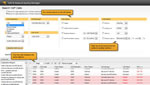
SolarWinds VoIP and Network Quality Manager enables advanced VoIP troubleshooting by correlating individual call performance with corresponding network performance metrics.
- Troubleshoot VoIP performance issues by correlating individual call and network performance metrics
- Search, filter and report on call detail records (CDRs)
- Generate real-time alerts when critical call performance thresholds are exceeded
Tired of having users complain about the voice quality of their IP phones? Wouldn’t it be nice to see all the details of the VoIP calls on your network? VoIP & Network Quality Manager gives you the ability to monitor, analyze and troubleshoot your VoIP network using the data avaialable in your Call Detail Records (CDRs) and Call Management Records (CMRs) alongside WAN performance metrics to maintain good voice quality.
With VoIP & Network Quality Manager, you can configure VoIP network alerts to notify you when specific voice quality thresholds are violated and then search for potential patterns within the same region, timeframe or reason code to troubleshoot the issue.
- Search and filter calls by origination or destination phone number, call manager, region, time of call, call quality metrics and more.
- Retain CDR information for up to one month, enabling you to search and view historical VoIP call details.
- Create and associate IPSLA operations to correlate call performance with WAN performance for troubleshooting, and VoIP quality optimization.
Learn More about VoIP Troubleshooting » -
WAN & VoIP Monitoring Dashboards
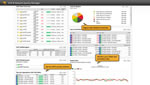
SolarWinds VoIP & Network Quality Manager provides customizable at-a-glance insight into all aspects of your WAN and VoIP performance through an intuitive LUCID™ Web interface.
- Quickly and easily identify VoIP call quality & WAN performance issues using a highly intuitive, Web-based interface with drill-down capability
- View call detail records (CDRs) alongside WAN performance in a single pane of glass
- Review Top 10 lists detailing VoIP performance & IP SLA operation status across your network
- View your VoIP & WAN performance map for at-a-glance health indicators
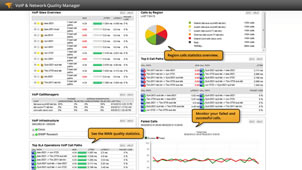
Monitoring VoIP & WAN performance has never been easier. In fact, VoIP & Network Quality Manager allows you to build a custom dashboard that gives you at-a-glance insight into all aspects of VoIP and WAN performance, including a global snapshot of all of your call detail records (CDRs), call management records (CMRs) and IP SLA operations.
Handy Top 10 lists detail critical VoIP call quality and IP SLA performance statistics, while VoIP & WAN performance maps make it easy to visualize site-to-site network performance, including the direction of performance issues. Changes on the map help you quickly determine if a site is experiencing poor performance so that you can troubleshoot the connection quickly.
Learn More about WAN & VoIP Monitoring Dashboards »
無料評価版 ダウンロード
30 日間 フル機能を用可能
System Requirements - One Software Fits All
|
Operating System Windows® 2003 & 2008 Server (32-bit or 64-bit) including R2, with IIS installed, running in 32-bit mode Windows 2008 Server (32-bit or 64-bit) with IIS installed, running in 32-bit mode |
Environment VoIP & Network Quality Manger sites are limited to locations where there is an existing, Cisco IP SLA-compatible router to serve as a simulation node. For more information about IP SLA-capable routers and switches, go to www.cisco.com/go/fn. |
|
.Net Framework Version 3.5 or later |
CPU Dual processor, 3 GHz |
|
Database SQL Server® 2005 SP1 Express, Standard, Enterprise SQL Server 2008 Express, Standard or Enterprise |
Memory 3 GB |
|
Hard Drive 20 GB |
NOTE: The minimum server requirements listed assume default configuration. Significantly increasing the poll rate or statistic collection rate could result in additional load on the server, which may require a larger CPU or additional memory.
Must-Have Features of SolarWinds’ VoIP QoS Software
-
VoIP Gateway & Trunk Monitoring
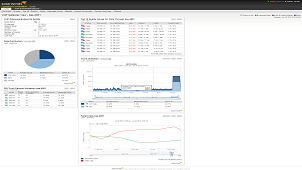
VoIP & Network Quality Manager monitors your Cisco VoIP gateway and PRI trunk, and displays trunk and channel utilization alongside quality issues in an easy-to-understand dedicated view.
- Monitors and displays Cisco gateway PRI trunk(s) and channel utilization
- Graphically displays distribution of VoIP and data across all trunks and per each trunk separately
- Identifies top 10 quality issues for all calls through a designated gateway
- Current percent utilization for each interface
Lacking visibility into the performance of your Cisco VoIP gateway? Don’t know how your PRI trunk is being utilized? Or, perhaps you’re paying for capacity that isn’t being used. SolarWinds VoIP & Network Quality Manager provides a detailed view of VoIP gateway details and performance including PRI trunk and channel utilization, distribution of VoIP and data, and a list of the top 10 quality issues through a designated gateway. This allows you to see exactly how your VoIP capacity is being used and identify potential issues before they impact users.
Learn More about Gateway and Trunk Monitoring » -
Call Signaling Chart View
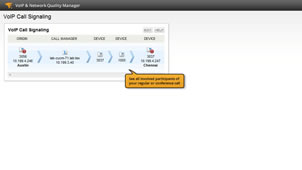
SolarWinds VoIP & Network Quality Manager provides a pictorial representation of the packets exchanged from the call initiation, during progress and end of call, as well as displays the requests that took place from call start to call end.
- Easily use call signaling information for debugging failed calls
- View call details including: protocol, status, code, source port, and destination port
- Support for a call precedence
VoIP & Network Quality Manager provides a chart view of call signaling that is used in voice over IP (VoIP ) systems to establish connections between H.323 endpoints, or between an endpoint and a gateway.
Learn More about Call Signaling Charts » -
Automatic IP SLA Setup
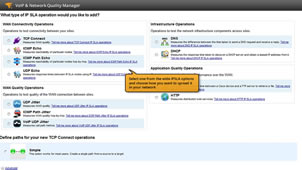
SolarWinds VoIP & Network Quality Manager allows you to set up IP SLA operations on your edge routers and switches with a wizard-like interface. You won’t need any complicated CLI commands to get started; just a few clicks of your mouse and you’re off.
- Avoid complicated CLI commands with a handy, step-by-step wizard for adding IP SLA operations
- Choose from three methods of IP SLA deployment (fully meshed, hub & spoke or custom)
- Quickly determine which network devices support IP SLA
VoIP & Network Quality Manager automatically determines which devices support IP SLA operations. Select from a list of network devices and the IP SLA operations to apply. Before you know it, you’ll be able to monitor your VoIP and WAN network.
Learn More about IP SLA Setup » -
VoIP and WAN Capacity Planning
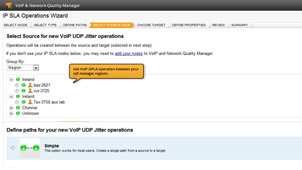
SolarWinds VoIP & Network Quality Manager generates synthetic VoIP traffic using Cisco IP SLA technology to facilitate capacity planning and measure voice quality in advance of new VoIP deployments.
- Easily establish a performance baseline by generating synthetic VoIP traffic to confirm call quality prior to full deployment
- Quickly quantify performance for emulated VoIP traffic in terms of cumulative throughput , packet loss, and mean opinion scores
VoIP & Network Quality Manager’s synthetic VoIP traffic generator delivers a method to model real-world VoIP traffic to, not only create a performance baseline for VoIP deployments, but also continue monitor and analyze voice quality to ensure end users are happy.
Learn More about WAN & VoIP Capacity Planning » -
Customizable Performance Reports
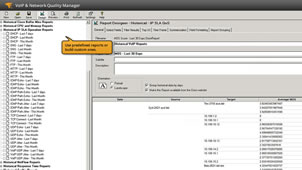
VoIP and Network Quality Manager makes it easy to generate WAN and VoIP performance reports using out-of-the-box templates that can be customized with a few mouse clicks, automating report creation and distribution.
- Create VoIP and WAN performance availability reports using out-of-the-box and community generated templates
- Customize built-in network reports with a few mouse clicks
- Automate report notifications for your management team
VoIP and Network Quality Manager’s advanced reporting engine enables you to quickly generate custom reports that can be viewed or printed on the web. Shipping with numerous built-in reports, VoIP and Network Quality Manager makes it easy to report on VoIP and WAN performance data over specific time periods.
If you can’t find a network report that matches your criteria, check out thwack , SolarWinds online community, where customers have generated hundreds of reports that you can easily import into VoIP & Network Quality Manager. Plus, you can quickly customize built-in network reports and community-generated templates using VoIP & Network Quality Manager’s web interface. You can even create completely customized reports using SQL commands. VoIP & Network Quality Manager's reports can be modified to limit the information contained in the report by user profile, enabling you to generate reports for specific departments or recipients.
Learn More about WAN & VoIP Performance Reporting »
無料評価版 ダウンロード
30 日間 フル機能を用可能
Demos
-
Live Demo: SolarWinds VoIP & Network Quality Manager
Drive our live demo to discover how Orion IP SLA Manager monitors VoIP and WAN performance from the perspective of your remote sites by tracking key edge-to-edge router & VoIP performance statistics using Cisco IP SLA technology.
Datasheets
-
Datasheet: VoIP & Network Quality Manager
Stay a step ahead of VoIP Quality of Service (QoS) issues and end-user complaints. SolarWinds VoIP & Network Quality Manager monitors VoIP performance by analyzing Call Detail Records generated by Cisco® CallManager and helps you proactively identify and eliminate distortion, latency, and noise.
Videos
-
VoIP & Network Quality Manager Overview
Tired of end user complaints about VoIP call quality? Watch how SolarWinds VoIP & Network Quality Manager monitors and correlates key VoIP and WAN performance metrics for advanced troubleshooting. Monitor and alert on VoIP jitter, latency, packet loss, MOS and more.
-
VoIP & Network Quality Manager Guided Tour
Tired of end user complaints about VoIP call quality? Watch how SolarWinds VoIP & Network Quality Manager monitors and correlates key VoIP and WAN performance metrics for advanced troubleshooting. Monitor and alert on VoIP jitter, latency, packet loss, MOS and more. Search, filter, display and report on call detail records (CDRs). Monitor key WAN applications by analyzing the performance of the underlying network protocols, including DNS lookups, FTP, HTTP, UDP jitter and TCP connect, even in firewalled environments. This tour, guided by a SolarWinds Sales Engineer, will provide a detailed overview of the features and functions. of VoIP and Network Quality Manager.
Whitepapers
-
Troubleshooting Common Issues in VoIP
Learn more about Voice over Internet Protocol (VoIP), including common VoIP metrics used, best practices in VoIP management and tips and tricks for VoIP troubleshooting.
-
Leveraging Cisco IP SLA in Your Environment
Cisco IP Service Level Agreements, also known as IP SLA, is a technology that is available by default on most Cisco routers and switches and can be used to measure end-to-end network performance. IP SLA reports on various metrics that give visibility into network availability, network and IP application performance, and troubleshooting.
-
VoIP Management Essentials
The rapid change from legacy packed switched voice services to Voice over IP (VoIP) has created new challenges in understanding and managing today’s voice networks. With the move to VoIP, two paths for VoIP management emerged: appliance based VoIP monitoring and software solutions. Learn more about the differences between the two, and take an in depth look at SolarWinds software solution, Voice and Network Quality Manager (VNQM)
Product Guides
-
SolarWinds VoIP Network Quality Manager Administrator Guide
The SolarWinds VoIP Network Quality Manager Administrator Guide provides detailed setup, configuration and conceptual information. It also provides help for every window in the VoIP Network Quality Manager user interface.
Product FAQ
-
Q: How is SolarWinds VoIP & Network Quality Manager (VNQM) licensed?
A: SolarWinds VoIP & Network Quality Manager is licensed by the largest number of the two following element types:
- IP SLA Source Devices
- IP Phones being monitored
An IP SLA source device is any network device that originates an IP SLA operation.
- VNQM IP SLA 5, IP Phone 300(up to 5 IP SLA source devices, 300 IP Phones)
- VNQM (IP SLA 25, IP Phone 1500(up to 25 IP SLA source devices, 1500 IP Phones)
- VNQM (IP SLA 50, IP Phone 3000(up to 50 IP SLA source devices, 3000 IP Phones)
- VNQM (IP SLA X, IP Phone X(unlimited source devices, unlimited IP Phones)
Example 1: 20 IP SLA source devices, of which 4 are being monitored, and 200 IP phones would require the VNQM IP SLA 5, IP Phone 300.
Example 2: 20 IP SLA source devices, of which 4 are being monitored, and 2000 IP phones would require the VNQM IP SLA 50, IP Phone 3000
-
Q: What VoIP metrics does VoIP & Network Quality Manager support?
A: VoIP & Network Quality Manager supports:
- Mean Opinion Score (MOS)
- Jitter
- Delay
- Latency
- Packet loss
- Codec
- Call signaling
- Call path
- Insights into Cisco Call Manager (CCM)
-
Q: Which Cisco IP SLA operations does VoIP & Network Quality Manager support?
- HTTP – Measure the round-trip time to access a Web page
- FTP – Measure the round-trip time to transfer a file
- DNS – Measure the DNS look look-up time (time to request and receive a reply)
- DHCP – Measure the round-trip time to retrieve an IP address
- TCP Connect – Measure connection time, which is useful for application and server monitoring
- UDP Jitter – Measure round-trip delay, one-way delay, one-way jitter, and one-way packet loss
- VoIP UDP Jitter – Measure VoIP call path metrics
- ICMP Echo – Measure round-trip delay
- UDP Echo – Measure response times between IP SLA nodes using IP
- ICMP Path Echo – Discover a network path using traceroute and measure the response time between a Cisco router and devices using IP
- ICMP Path Jitter – Measure the inter-packet delay variance along a tracerouted network path
無料評価版 ダウンロード
30 日間 フル機能を用可能
Extensions
As your IT infrastructure grows, SolarWinds’ products scale to meet your monitoring and management needs.
Enterprise Operations Console (EOC)
Enterprise Operations Console delivers a consolidated command center for unified visibility into the remote SolarWinds deployments throughout your geographically distributed networks.
Learn More »Additional Polling Engines
By adding additional polling engines, you can distribute the polling load between multiple servers to provide scalability for large IT infrastructures.
Learn More »Failover Engine (FoE)
SolarWinds Failover Engine monitors the health of your SolarWinds servers to ensure you never lose visibility of the performance of monitored elements in your IT infrastructure. If something should happen to your primary SolarWinds server, the Failover Engine automatically fails over to a remote server.
Learn More »Web Server Engine
By adding an additional web server engine, you can enable more users to access the dashboards and reports in the SolarWinds web portal without potential performance degradation.
Learn More »
無料評価版 ダウンロード
30 日間 フル機能を用可能
Version History
4.2
SolarWinds VoIP and Network Quality Manager adds support for Avaya Call Monitoring & Troubleshooting and other enhancements.
- Support for Avaya VoIP Call Monitoring and Troubleshooting
- CDR and CQR monitoring of 1:1 and conference VoIP calls with MOS, Jitter, Latency, and end-point information
- Avaya gateway detection on a signaling chart and call success rate monitoring
- Alerting and Reporting Avaya VoIP statistics
- Faster search of CDR and CQE records
- Call Manager phone registration resource with full text search and other enhancements.
+ Read More
4.1
SolarWinds VoIP & Network Quality Manager provides a VoIP gateway details dedicated view along with improved integration with Network Performance Monitor and Web based reporting.
- VoIP gateway dedicated view to monitor and display PRI trunk and channel utilization, distribution of VoIP and data usage, and top 10 quality issues
- VoIP node details subview when integrated with SolarWinds Network Performance Monitor
- Web based reporting
+ Read More
v
4.0
VoIP and Network Quality Manager is the next generation of SolarWinds IP SLA Manager and delivers powerful VoIP monitoring and troubleshooting for identification of VoIP call performance and quality, along with WAN performance monitoring:
- Standalone or fully integrated with SolarWinds Network Performance Monitor
- Monitor and Troubleshoot VoIP call performance using Call Detail Records (CDRs) and Call Management Records (CMRs)
- Cisco Call Manager v7 and V8 support with detailed gateway information
- VoIP call performance and quality alerts and reports
- TCP support for settings in firewalled environments
+ Read More
v
3.5
SolarWinds IP SLA Manager continues to deliver network monitoring features aimed at improving your ability to identify site-specific or WAN-related network performance issues from the perspective of each of your remote sites.
With the latest release of Orion IP SLA Manager, we’ve added support for two new Cisco IP SLA operations:
- ICMP Path Echo
- ICMP Path Jitter
These powerful new features provide insight into the response time and inter-packet delays along a given tracerouted network path. Additionally, Orion IP SLA Manager will automatically discover existing, manually created operations on a device – simplifying IP SLA management on your distributed network.
+ Read More
v
3.1
As the next generation of the Orion VoIP Monitor module for Orion NMS, Orion IP SLA Manager delivers a powerful network monitoring and management solution for identifying site-specific or WAN-related network performance issues from the perspective of each of your remote sites:
- Automated Device Discovery
- WAN Performance Dashboard
- Automatic IP SLA Setup
- Advanced VoIP Monitoring
+ Read More
To see a complete version history for SolarWinds VoIP & Network Quality Manager, please visit our
release notes .
Tips and Training
VoIP & Network Quality Manager Guided Tour
Watch the video
Awards & Props
Some of the companies that rely on us
SolarWinds is trusted by Fortune 500 companies, & small businesses alike.
Download
VoIP & Network Quality Manager now and start VoIP troubleshooting within an hour!
-
Your software is 100% functional
for 30 days.
No obligation. - Deploy and discover your VoIP environment and edge devices in less than an hour.
- Get a global snapshot of your IP SLA operations in less than an hour.
無料評価版
ダウンロード 30 日間 フル機能を用可能
ダウンロード 30 日間 フル機能を用可能


