





Analyze, Report and Improve Your Project Content
MadCap Analyzer is a powerful analytic tool for your Flare projects. Find critical issues immediately, such as missing content or broken links, and non-critical technical issues such as unused style sheets or images that can be removed from projects. Create custom reports and share information with documentation teams and managers to identify issues, track progress, and ensure quality and efficiency in your documentation.
- Product Demonstration
- Key Features Guide
- For RoboHelp鬯�E¯ãƒ»�E¯ç¹�サ・�E¯éƒ¢æ™¢�E½�E»ç¹�サ・�E¯é©›ï½¢èŽï½¢ãƒ»�E½ãƒ»�E»éƒ¢æ™¢�E½�E»ç¹�サ・�E¯é¬©å¹¢�E½�E¢éš´è¶£�E½�E¢ç¹�サ・�E½ç¹�サ・�E»é©›ï½¢èŽï½¢ãƒ»�E½ãƒ»�E»éƒ¢æ™¢�E½�E»ç¹�サ・�E©é¬¯�E¯ãƒ»�E®ç¹�サ・�E¯é««�E´é›œï½£ãƒ»�E½ãƒ»�E¢éƒ¢æ™¢�E½�E»ç¹�サ・�E½éƒ¢æ™¢�E½�E»ç¹�サ・�E·é¬©å¹¢�E½�E¢éš´è¶£�E½�E¢ç¹�サ・�E½ç¹�サ・�E»é©›ï½¢èŽï½¢ãƒ»�E½ãƒ»�E»éƒ¢æ™¢�E½�E»ç¹�サ・�E¢é¬¯�E©èŸ·�E¢ãƒ»�E½ãƒ»�E¢é««�E´é›œï½£ãƒ»�E½ãƒ»�E¢éƒ¢æ™¢�E½�E»ç¹�サ・�E½éƒ¢æ™¢�E½�E»ç¹�サ・�E»é¬©å¹¢�E½�E¢éš´è¶£�E½�E¢ç¹�サ・�E½ç¹�サ・�E»é©›ï½¢èŽï½¢ãƒ»�E½ãƒ»�E»éƒ¢æ™¢�E½�E»ç¹�サ・�E½é¬¯�E©èŸ·�E¢ãƒ»�E½ãƒ»�E¢é««�E´é›œï½£ãƒ»�E½ãƒ»�E¢éƒ¢æ™¢�E½�E»ç¹�サ・�E½éƒ¢æ™¢�E½�E»ç¹�サ・�E»é¬©å¹¢�E½�E¢éš´è¶£�E½�E¢ç¹�サ・�E½ç¹�サ・�E»é©›ï½¢èŽï½¢ãƒ»�E½ãƒ»�E»éƒ¢æ™¢�E½�E»ç¹�サ・�E¢é¬¯�E¯ãƒ»�E¯ç¹�サ・�E¯éƒ¢æ™¢�E½�E»ç¹�サ・�E®é©›ï½¢èŽï½¢ãƒ»�E½ãƒ»�E»éƒ¢æ™¢�E½�E»ç¹�サ・�E«é¬©å¹¢�E½�E¢éš´è¶£�E½�E¢ç¹�サ・�E½ç¹�サ・�E»é©›ï½¢èŽï½¢ãƒ»�E½ãƒ»�E»éƒ¢æ™¢�E½�E»ç¹�サ・�E´é¬¯�E¯ãƒ»�E¯ç¹�サ・�E®éƒ¢æ™¢�E½�E»ç¹�サ・�E®é¬®�E«ãƒ»�E²é™�キ・�E¢ç¹�サ・�E½ç¹�サ・�E¶é©›ï½¢èŽï½¢ãƒ»�E½ãƒ»�E»éƒ¢æ™¢�E½�E»ç¹�サ・�E½é©›ï½¢èŽï½¢ãƒ»�E½ãƒ»�E»éƒ¢æ™¢�E½�E»ç¹�サ・�E£é¬¯�E©èŸ·�E¢ãƒ»�E½ãƒ»�E¢é««�E´é›œï½£ãƒ»�E½ãƒ»�E¢éƒ¢æ™¢�E½�E»ç¹�サ・�E½éƒ¢æ™¢�E½�E»ç¹�サ・�E»é¬©å¹¢�E½�E¢éš´è¶£�E½�E¢ç¹�サ・�E½ç¹�サ・�E»é©›ï½¢èŽï½¢ãƒ»�E½ãƒ»�E»éƒ¢æ™¢�E½�E»ç¹�サ・�E½é¬¯�E©èŸ·�E¢ãƒ»�E½ãƒ»�E¢é««�E´é›œï½£ãƒ»�E½ãƒ»�E¢éƒ¢æ™¢�E½�E»ç¹�サ・�E½éƒ¢æ™¢�E½�E»ç¹�サ・�E»é¬©å¹¢�E½�E¢éš´è¶£�E½�E¢ç¹�サ・�E½ç¹�サ・�E»é©›ï½¢èŽï½¢ãƒ»�E½ãƒ»�E»éƒ¢æ™¢�E½�E»ç¹�サ・�E¢é¬¯�E¯ãƒ»�E¯ç¹�サ・�E©é«¯æ™¢�E½�E·ç¹�サ・�E¢éƒ¢æ™¢�E½�E»ç¹�サ・�E½éƒ¢æ™¢�E½�E»ç¹�サ・�E¢é¬¯�E®ãƒ»�E«ç¹�サ・�E´é¬®�E®è«›ï½¶ãƒ»�E½ãƒ»�E£éƒ¢æ™¢�E½�E»ç¹�サ・�E½éƒ¢æ™¢�E½�E»ç¹�サ・�E¢é¬©å¹¢�E½�E¢éš´è¶£�E½�E¢ç¹�サ・�E½ç¹�サ・�E»é©›ï½¢èŽï½¢ãƒ»�E½ãƒ»�E»éƒ¢æ™¢�E½�E»ç¹�サ・�E½é¬©å¹¢�E½�E¢éš´è¶£�E½�E¢ç¹�サ・�E½ç¹�サ・�E»é©›ï½¢èŽï½¢ãƒ»�E½ãƒ»�E»éƒ¢æ™¢�E½�E»ç¹�サ・�E»é¬¯�E¯ãƒ»�E©é™�キ・�E¢ç¹�サ・�E½ç¹�サ・�E¢é¬®�E«ãƒ»�E´é«®æ‡¶�E½�E£ç¹�サ・�E½ç¹�サ・�E¢é©›ï½¢èŽï½¢ãƒ»�E½ãƒ»�E»éƒ¢æ™¢�E½�E»ç¹�サ・�E½é©›ï½¢èŽï½¢ãƒ»�E½ãƒ»�E»éƒ¢æ™¢�E½�E»ç¹�サ・�E»é¬¯�E©èŸ·�E¢ãƒ»�E½ãƒ»�E¢é««�E´é›œï½£ãƒ»�E½ãƒ»�E¢éƒ¢æ™¢�E½�E»ç¹�サ・�E½éƒ¢æ™¢�E½�E»ç¹�サ・�E»é¬©å¹¢�E½�E¢éš´è¶£�E½�E¢ç¹�サ・�E½ç¹�サ・�E»é©›ï½¢èŽï½¢ãƒ»�E½ãƒ»�E»éƒ¢æ™¢�E½�E»ç¹�サ・�E½é¬¯�E¯ãƒ»�E¯ç¹�サ・�E©é«¯æ™¢�E½�E·ç¹�サ・�E¢éƒ¢æ™¢�E½�E»ç¹�サ・�E½éƒ¢æ™¢�E½�E»ç¹�サ・�E¢é¬¯�E®ãƒ»�E«ç¹�サ・�E´é¬®�E®è«›ï½¶ãƒ»�E½ãƒ»�E£éƒ¢æ™¢�E½�E»ç¹�サ・�E½éƒ¢æ™¢�E½�E»ç¹�サ・�E¢é¬©å¹¢�E½�E¢éš´è¶£�E½�E¢ç¹�サ・�E½ç¹�サ・�E»é©›ï½¢èŽï½¢ãƒ»�E½ãƒ»�E»éƒ¢æ™¢�E½�E»ç¹�サ・�E½é¬©å¹¢�E½�E¢éš´è¶£�E½�E¢ç¹�サ・�E½ç¹�サ・�E»é©›ï½¢èŽï½¢ãƒ»�E½ãƒ»�E»éƒ¢æ™¢�E½�E»ç¹�サ・�E»é¬¯�E¯ãƒ»�E©é™�キ・�E¢ç¹�サ・�E½ç¹�サ・�E¢é¬®�E«ãƒ»�E´é«®æ‡¶�E½�E£ç¹�サ・�E½ç¹�サ・�E¢é©›ï½¢èŽï½¢ãƒ»�E½ãƒ»�E»éƒ¢æ™¢�E½�E»ç¹�サ・�E½é©›ï½¢èŽï½¢ãƒ»�E½ãƒ»�E»éƒ¢æ™¢�E½�E»ç¹�サ・�E»é¬¯�E©èŸ·�E¢ãƒ»�E½ãƒ»�E¢é««�E´é›œï½£ãƒ»�E½ãƒ»�E¢éƒ¢æ™¢�E½�E»ç¹�サ・�E½éƒ¢æ™¢�E½�E»ç¹�サ・�E»é¬©å¹¢�E½�E¢éš´è¶£�E½�E¢ç¹�サ・�E½ç¹�サ・�E»é©›ï½¢èŽï½¢ãƒ»�E½ãƒ»�E»éƒ¢æ™¢�E½�E»ç¹�サ・�E»é¬¯�E¯ãƒ»�E¯ç¹�サ・�E¯éƒ¢æ™¢�E½�E»ç¹�サ・�E¯é©›ï½¢èŽï½¢ãƒ»�E½ãƒ»�E»éƒ¢æ™¢�E½�E»ç¹�サ・�E¯é¬©å¹¢�E½�E¢éš´è¶£�E½�E¢ç¹�サ・�E½ç¹�サ・�E»é©›ï½¢èŽï½¢ãƒ»�E½ãƒ»�E»éƒ¢æ™¢�E½�E»ç¹�サ・�E©é¬¯�E¯ãƒ»�E®ç¹�サ・�E¯é««�E´é›œï½£ãƒ»�E½ãƒ»�E¢éƒ¢æ™¢�E½�E»ç¹�サ・�E½éƒ¢æ™¢�E½�E»ç¹�サ・�E·é¬©å¹¢�E½�E¢éš´è¶£�E½�E¢ç¹�サ・�E½ç¹�サ・�E»é©›ï½¢èŽï½¢ãƒ»�E½ãƒ»�E»éƒ¢æ™¢�E½�E»ç¹�サ・�E¢é¬¯�E©èŸ·�E¢ãƒ»�E½ãƒ»�E¢é««�E´é›œï½£ãƒ»�E½ãƒ»�E¢éƒ¢æ™¢�E½�E»ç¹�サ・�E½éƒ¢æ™¢�E½�E»ç¹�サ・�E»é¬©å¹¢�E½�E¢éš´è¶£�E½�E¢ç¹�サ・�E½ç¹�サ・�E»é©›ï½¢èŽï½¢ãƒ»�E½ãƒ»�E»éƒ¢æ™¢�E½�E»ç¹�サ・�E½é¬¯�E©èŸ·�E¢ãƒ»�E½ãƒ»�E¢é««�E´é›œï½£ãƒ»�E½ãƒ»�E¢éƒ¢æ™¢�E½�E»ç¹�サ・�E½éƒ¢æ™¢�E½�E»ç¹�サ・�E»é¬©å¹¢�E½�E¢éš´è¶£�E½�E¢ç¹�サ・�E½ç¹�サ・�E»é©›ï½¢èŽï½¢ãƒ»�E½ãƒ»�E»éƒ¢æ™¢�E½�E»ç¹�サ・�E¢é¬¯�E¯ãƒ»�E¯ç¹�サ・�E©é«¯æ™¢�E½�E·ç¹�サ・�E¢éƒ¢æ™¢�E½�E»ç¹�サ・�E½éƒ¢æ™¢�E½�E»ç¹�サ・�E¢é¬¯�E®ãƒ»�E«ç¹�サ・�E´é¬®�E®è«›ï½¶ãƒ»�E½ãƒ»�E£éƒ¢æ™¢�E½�E»ç¹�サ・�E½éƒ¢æ™¢�E½�E»ç¹�サ・�E¢é¬©å¹¢�E½�E¢éš´è¶£�E½�E¢ç¹�サ・�E½ç¹�サ・�E»é©›ï½¢èŽï½¢ãƒ»�E½ãƒ»�E»éƒ¢æ™¢�E½�E»ç¹�サ・�E½é¬©å¹¢�E½�E¢éš´è¶£�E½�E¢ç¹�サ・�E½ç¹�サ・�E»é©›ï½¢èŽï½¢ãƒ»�E½ãƒ»�E»éƒ¢æ™¢�E½�E»ç¹�サ・�E»é¬¯�E¯ãƒ»�E©é™�キ・�E¢ç¹�サ・�E½ç¹�サ・�E¢é¬®�E«ãƒ»�E´é«®æ‡¶�E½�E£ç¹�サ・�E½ç¹�サ・�E¢é©›ï½¢èŽï½¢ãƒ»�E½ãƒ»�E»éƒ¢æ™¢�E½�E»ç¹�サ・�E½é©›ï½¢èŽï½¢ãƒ»�E½ãƒ»�E»éƒ¢æ™¢�E½�E»ç¹�サ・�E»é¬¯�E©èŸ·�E¢ãƒ»�E½ãƒ»�E¢é««�E´é›œï½£ãƒ»�E½ãƒ»�E¢éƒ¢æ™¢�E½�E»ç¹�サ・�E½éƒ¢æ™¢�E½�E»ç¹�サ・�E»é¬©å¹¢�E½�E¢éš´è¶£�E½�E¢ç¹�サ・�E½ç¹�サ・�E»é©›ï½¢èŽï½¢ãƒ»�E½ãƒ»�E»éƒ¢æ™¢�E½�E»ç¹�サ・�E§é¬¯�E¯ãƒ»�E¯ç¹�サ・�E¯éƒ¢æ™¢�E½�E»ç¹�サ・�E¯é©›ï½¢èŽï½¢ãƒ»�E½ãƒ»�E»éƒ¢æ™¢�E½�E»ç¹�サ・�E®é¬©å¹¢�E½�E¢éš´è¶£�E½�E¢ç¹�サ・�E½ç¹�サ・�E»é©›ï½¢èŽï½¢ãƒ»�E½ãƒ»�E»éƒ¢æ™¢�E½�E»ç¹�サ・�E«é¬¯�E©èŸ·�E¢ãƒ»�E½ãƒ»�E¢é««�E´é›œï½£ãƒ»�E½ãƒ»�E¢éƒ¢æ™¢�E½�E»ç¹�サ・�E½éƒ¢æ™¢�E½�E»ç¹�サ・�E»é¬©å¹¢�E½�E¢éš´è¶£�E½�E¢ç¹�サ・�E½ç¹�サ・�E»é©›ï½¢èŽï½¢ãƒ»�E½ãƒ»�E»éƒ¢æ™¢�E½�E»ç¹�サ・�E°é¬¯�E¯ãƒ»�E¯ç¹�サ・�E©é«¯æ™¢�E½�E·ç¹�サ・�E¢éƒ¢æ™¢�E½�E»ç¹�サ・�E½éƒ¢æ™¢�E½�E»ç¹�サ・�E¢é¬¯�E®ãƒ»�E«ç¹�サ・�E´é¬®�E®è«›ï½¶ãƒ»�E½ãƒ»�E£éƒ¢æ™¢�E½�E»ç¹�サ・�E½éƒ¢æ™¢�E½�E»ç¹�サ・�E¢é¬©å¹¢�E½�E¢éš´è¶£�E½�E¢ç¹�サ・�E½ç¹�サ・�E»é©›ï½¢èŽï½¢ãƒ»�E½ãƒ»�E»éƒ¢æ™¢�E½�E»ç¹�サ・�E½é¬©å¹¢�E½�E¢éš´è¶£�E½�E¢ç¹�サ・�E½ç¹�サ・�E»é©›ï½¢èŽï½¢ãƒ»�E½ãƒ»�E»éƒ¢æ™¢�E½�E»ç¹�サ・�E»é¬¯�E¯ãƒ»�E¯ç¹�サ・�E©é«¯å…·�E½�E¹éƒ¢æ™¢�E½�E»ç¹�サ・�E½ç¹�サ・�E½éƒ¢æ™¢�E½�E»ç¹�サ・�E¶é¬¯�E®ãƒ»�E£é™‹ï½¹ç¹�サ・�E½ãƒ»�E½ç¹�サ・�Eµé¬®�E«ãƒ»�E´é—”ィ螟イ・�E½ãƒ»�E½ç¹�サ・�E¦é©›ï½¢èŽï½¢ãƒ»�E½ãƒ»�E»éƒ¢æ™¢�E½�E»ç¹�サ・�E½é©›ï½¢èŽï½¢ãƒ»�E½ãƒ»�E»éƒ¢æ™¢�E½�E»ç¹�サ・�E§é¬©å¹¢�E½�E¢éš´è¶£�E½�E¢ç¹�サ・�E½ç¹�サ・�E»é©›ï½¢èŽï½¢ãƒ»�E½ãƒ»�E»éƒ¢æ™¢�E½�E»ç¹�サ・�E鬯�E¯ãƒ»�E©é™�キ・�E¢ç¹�サ・�E½ç¹�サ・�E¢é¬®�E«ãƒ»�E´é«®æ‡¶�E½�E£ç¹�サ・�E½ç¹�サ・�E¢é©›ï½¢èŽï½¢ãƒ»�E½ãƒ»�E»éƒ¢æ™¢�E½�E»ç¹�サ・�E½é©›ï½¢èŽï½¢ãƒ»�E½ãƒ»�E»éƒ¢æ™¢�E½�E»ç¹�サ・�E»é¬¯�E¯ãƒ»�E©é™�キ・�E¢ç¹�サ・�E½ç¹�サ・�E¢é¬®�E«ãƒ»�E´é«®æ‡¶�E½�E£ç¹�サ・�E½ç¹�サ・�E¢é©›ï½¢èŽï½¢ãƒ»�E½ãƒ»�E»éƒ¢æ™¢�E½�E»ç¹�サ・�E½é©›ï½¢èŽï½¢ãƒ»�E½ãƒ»�E»éƒ¢æ™¢�E½�E»ç¹�サ・�E»é¬¯�E©èŸ·�E¢ãƒ»�E½ãƒ»�E¢é««�E´é›œï½£ãƒ»�E½ãƒ»�E¢éƒ¢æ™¢�E½�E»ç¹�サ・�E½éƒ¢æ™¢�E½�E»ç¹�サ・�E»é¬©å¹¢�E½�E¢éš´è¶£�E½�E¢ç¹�サ・�E½ç¹�サ・�E»é©›ï½¢èŽï½¢ãƒ»�E½ãƒ»�E»éƒ¢æ™¢�E½�E»ç¹�サ・�E½é¬¯�E¯ãƒ»�E¯ç¹�サ・�E©é«¯æ™¢�E½�E·ç¹�サ・�E¢éƒ¢æ™¢�E½�E»ç¹�サ・�E½éƒ¢æ™¢�E½�E»ç¹�サ・�E¢é¬¯�E®ãƒ»�E«ç¹�サ・�E´é¬®�E®è«›ï½¶ãƒ»�E½ãƒ»�E£éƒ¢æ™¢�E½�E»ç¹�サ・�E½éƒ¢æ™¢�E½�E»ç¹�サ・�E¢é¬©å¹¢�E½�E¢éš´è¶£�E½�E¢ç¹�サ・�E½ç¹�サ・�E»é©›ï½¢èŽï½¢ãƒ»�E½ãƒ»�E»éƒ¢æ™¢�E½�E»ç¹�サ・�E½é¬©å¹¢�E½�E¢éš´è¶£�E½�E¢ç¹�サ・�E½ç¹�サ・�E»é©›ï½¢èŽï½¢ãƒ»�E½ãƒ»�E»éƒ¢æ™¢�E½�E»ç¹�サ・�E»é¬¯�E¯ãƒ»�E©é™�キ・�E¢ç¹�サ・�E½ç¹�サ・�E¢é¬®�E«ãƒ»�E´é«®æ‡¶�E½�E£ç¹�サ・�E½ç¹�サ・�E¢é©›ï½¢èŽï½¢ãƒ»�E½ãƒ»�E»éƒ¢æ™¢�E½�E»ç¹�サ・�E½é©›ï½¢èŽï½¢ãƒ»�E½ãƒ»�E»éƒ¢æ™¢�E½�E»ç¹�サ・�E»é¬¯�E©èŸ·�E¢ãƒ»�E½ãƒ»�E¢é««�E´é›œï½£ãƒ»�E½ãƒ»�E¢éƒ¢æ™¢�E½�E»ç¹�サ・�E½éƒ¢æ™¢�E½�E»ç¹�サ・�E»é¬©å¹¢�E½�E¢éš´è¶£�E½�E¢ç¹�サ・�E½ç¹�サ・�E»é©›ï½¢èŽï½¢ãƒ»�E½ãƒ»�E»éƒ¢æ™¢�E½�E»ç¹�サ・�E½é¬¯�E¯ãƒ»�E¯ç¹�サ・�E¯éƒ¢æ™¢�E½�E»ç¹�サ・�E©é¬®�E¯èŽï½¢ãƒ»�E½ãƒ»�E·éƒ¢æ™¢�E½�E»ç¹�サ・�E¢é©›ï½¢èŽï½¢ãƒ»�E½ãƒ»�E»éƒ¢æ™¢�E½�E»ç¹�サ・�E½é©›ï½¢èŽï½¢ãƒ»�E½ãƒ»�E»éƒ¢æ™¢�E½�E»ç¹�サ・�E¢é¬¯�E¯ãƒ»�E®ç¹�サ・�E«éƒ¢æ™¢�E½�E»ç¹�サ・�E´é¬¯�E®ãƒ»�E®éš²å¹¢�E½�E¶ç¹�サ・�E½ç¹�サ・�E£é©›ï½¢èŽï½¢ãƒ»�E½ãƒ»�E»éƒ¢æ™¢�E½�E»ç¹�サ・�E½é©›ï½¢èŽï½¢ãƒ»�E½ãƒ»�E»éƒ¢æ™¢�E½�E»ç¹�サ・�E¢é¬¯�E©èŸ·�E¢ãƒ»�E½ãƒ»�E¢é««�E´é›œï½£ãƒ»�E½ãƒ»�E¢éƒ¢æ™¢�E½�E»ç¹�サ・�E½éƒ¢æ™¢�E½�E»ç¹�サ・�E»é¬©å¹¢�E½�E¢éš´è¶£�E½�E¢ç¹�サ・�E½ç¹�サ・�E»é©›ï½¢èŽï½¢ãƒ»�E½ãƒ»�E»éƒ¢æ™¢�E½�E»ç¹�サ・�E½é¬¯�E©èŸ·�E¢ãƒ»�E½ãƒ»�E¢é««�E´é›œï½£ãƒ»�E½ãƒ»�E¢éƒ¢æ™¢�E½�E»ç¹�サ・�E½éƒ¢æ™¢�E½�E»ç¹�サ・�E»é¬©å¹¢�E½�E¢éš´è¶£�E½�E¢ç¹�サ・�E½ç¹�サ・�E»é©›ï½¢èŽï½¢ãƒ»�E½ãƒ»�E»éƒ¢æ™¢�E½�E»ç¹�サ・�E»é¬¯�E¯ãƒ»�E¯ç¹�サ・�E©é«¯æ™¢�E½�E·ç¹�サ・�E¢éƒ¢æ™¢�E½�E»ç¹�サ・�E½éƒ¢æ™¢�E½�E»ç¹�サ・�E¢é¬¯�E®ãƒ»�E«ç¹�サ・�E´é¬®�E®è«›ï½¶ãƒ»�E½ãƒ»�E£éƒ¢æ™¢�E½�E»ç¹�サ・�E½éƒ¢æ™¢�E½�E»ç¹�サ・�E¢é¬©å¹¢�E½�E¢éš´è¶£�E½�E¢ç¹�サ・�E½ç¹�サ・�E»é©›ï½¢èŽï½¢ãƒ»�E½ãƒ»�E»éƒ¢æ™¢�E½�E»ç¹�サ・�E½é¬©å¹¢�E½�E¢éš´è¶£�E½�E¢ç¹�サ・�E½ç¹�サ・�E»é©›ï½¢èŽï½¢ãƒ»�E½ãƒ»�E»éƒ¢æ™¢�E½�E»ç¹�サ・�E»é¬¯�E¯ãƒ»�E©é™�キ・�E¢ç¹�サ・�E½ç¹�サ・�E¢é¬®�E«ãƒ»�E´é«®æ‡¶�E½�E£ç¹�サ・�E½ç¹�サ・�E¢é©›ï½¢èŽï½¢ãƒ»�E½ãƒ»�E»éƒ¢æ™¢�E½�E»ç¹�サ・�E½é©›ï½¢èŽï½¢ãƒ»�E½ãƒ»�E»éƒ¢æ™¢�E½�E»ç¹�サ・�E»é¬¯�E©èŸ·�E¢ãƒ»�E½ãƒ»�E¢é««�E´é›œï½£ãƒ»�E½ãƒ»�E¢éƒ¢æ™¢�E½�E»ç¹�サ・�E½éƒ¢æ™¢�E½�E»ç¹�サ・�E»é¬©å¹¢�E½�E¢éš´è¶£�E½�E¢ç¹�サ・�E½ç¹�サ・�E»é©›ï½¢èŽï½¢ãƒ»�E½ãƒ»�E»éƒ¢æ™¢�E½�E»ç¹�サ・�E½é¬¯�E¯ãƒ»�E¯ç¹�サ・�E¯éƒ¢æ™¢�E½�E»ç¹�サ・�E¯é©›ï½¢èŽï½¢ãƒ»�E½ãƒ»�E»éƒ¢æ™¢�E½�E»ç¹�サ・�E©é¬¯�E®ãƒ»�E¯éš´è¶£�E½�E¢ç¹�サ・�E½ç¹�サ・�E·é©›ï½¢èŽï½¢ãƒ»�E½ãƒ»�E»éƒ¢æ™¢�E½�E»ç¹�サ・�E¢é¬©å¹¢�E½�E¢éš´è¶£�E½�E¢ç¹�サ・�E½ç¹�サ・�E»é©›ï½¢èŽï½¢ãƒ»�E½ãƒ»�E»éƒ¢æ™¢�E½�E»ç¹�サ・�E½é¬©å¹¢�E½�E¢éš´è¶£�E½�E¢ç¹�サ・�E½ç¹�サ・�E»é©›ï½¢èŽï½¢ãƒ»�E½ãƒ»�E»éƒ¢æ™¢�E½�E»ç¹�サ・�E¢é¬¯�E¯ãƒ»�E¯ç¹�サ・�E®éƒ¢æ™¢�E½�E»ç¹�サ・�E«é©›ï½¢èŽï½¢ãƒ»�E½ãƒ»�E»éƒ¢æ™¢�E½�E»ç¹�サ・�E´é¬¯�E¯ãƒ»�E®ç¹�サ・�E®é««�E²èŸ·�E¢ãƒ»�E½ãƒ»�E¶éƒ¢æ™¢�E½�E»ç¹�サ・�E½éƒ¢æ™¢�E½�E»ç¹�サ・�E£é¬©å¹¢�E½�E¢éš´è¶£�E½�E¢ç¹�サ・�E½ç¹�サ・�E»é©›ï½¢èŽï½¢ãƒ»�E½ãƒ»�E»éƒ¢æ™¢�E½�E»ç¹�サ・�E½é¬©å¹¢�E½�E¢éš´è¶£�E½�E¢ç¹�サ・�E½ç¹�サ・�E»é©›ï½¢èŽï½¢ãƒ»�E½ãƒ»�E»éƒ¢æ™¢�E½�E»ç¹�サ・�E¢é¬¯�E¯ãƒ»�E©é™�キ・�E¢ç¹�サ・�E½ç¹�サ・�E¢é¬®�E«ãƒ»�E´é«®æ‡¶�E½�E£ç¹�サ・�E½ç¹�サ・�E¢é©›ï½¢èŽï½¢ãƒ»�E½ãƒ»�E»éƒ¢æ™¢�E½�E»ç¹�サ・�E½é©›ï½¢èŽï½¢ãƒ»�E½ãƒ»�E»éƒ¢æ™¢�E½�E»ç¹�サ・�E»é¬¯�E©èŸ·�E¢ãƒ»�E½ãƒ»�E¢é««�E´é›œï½£ãƒ»�E½ãƒ»�E¢éƒ¢æ™¢�E½�E»ç¹�サ・�E½éƒ¢æ™¢�E½�E»ç¹�サ・�E»é¬©å¹¢�E½�E¢éš´è¶£�E½�E¢ç¹�サ・�E½ç¹�サ・�E»é©›ï½¢èŽï½¢ãƒ»�E½ãƒ»�E»éƒ¢æ™¢�E½�E»ç¹�サ・�E½é¬¯�E¯ãƒ»�E©é™�キ・�E¢ç¹�サ・�E½ç¹�サ・�E¢é¬®�E«ãƒ»�E´é«®æ‡¶�E½�E£ç¹�サ・�E½ç¹�サ・�E¢é©›ï½¢èŽï½¢ãƒ»�E½ãƒ»�E»éƒ¢æ™¢�E½�E»ç¹�サ・�E½é©›ï½¢èŽï½¢ãƒ»�E½ãƒ»�E»éƒ¢æ™¢�E½�E»ç¹�サ・�E»é¬¯�E©èŸ·�E¢ãƒ»�E½ãƒ»�E¢é««�E´é›œï½£ãƒ»�E½ãƒ»�E¢éƒ¢æ™¢�E½�E»ç¹�サ・�E½éƒ¢æ™¢�E½�E»ç¹�サ・�E»é¬©å¹¢�E½�E¢éš´è¶£�E½�E¢ç¹�サ・�E½ç¹�サ・�E»é©›ï½¢èŽï½¢ãƒ»�E½ãƒ»�E»éƒ¢æ™¢�E½�E»ç¹�サ・�E»é¬¯�E¯ãƒ»�E¯ç¹�サ・�E¯éƒ¢æ™¢�E½�E»ç¹�サ・�E©é¬®�E¯èŽï½¢ãƒ»�E½ãƒ»�E·éƒ¢æ™¢�E½�E»ç¹�サ・�E¢é©›ï½¢èŽï½¢ãƒ»�E½ãƒ»�E»éƒ¢æ™¢�E½�E»ç¹�サ・�E½é©›ï½¢èŽï½¢ãƒ»�E½ãƒ»�E»éƒ¢æ™¢�E½�E»ç¹�サ・�E¢é¬¯�E¯ãƒ»�E®ç¹�サ・�E«éƒ¢æ™¢�E½�E»ç¹�サ・�E´é¬¯�E®ãƒ»�E®éš²å¹¢�E½�E¶ç¹�サ・�E½ç¹�サ・�E£é©›ï½¢èŽï½¢ãƒ»�E½ãƒ»�E»éƒ¢æ™¢�E½�E»ç¹�サ・�E½é©›ï½¢èŽï½¢ãƒ»�E½ãƒ»�E»éƒ¢æ™¢�E½�E»ç¹�サ・�E¢é¬¯�E©èŸ·�E¢ãƒ»�E½ãƒ»�E¢é««�E´é›œï½£ãƒ»�E½ãƒ»�E¢éƒ¢æ™¢�E½�E»ç¹�サ・�E½éƒ¢æ™¢�E½�E»ç¹�サ・�E»é¬©å¹¢�E½�E¢éš´è¶£�E½�E¢ç¹�サ・�E½ç¹�サ・�E»é©›ï½¢èŽï½¢ãƒ»�E½ãƒ»�E»éƒ¢æ™¢�E½�E»ç¹�サ・�E½é¬¯�E©èŸ·�E¢ãƒ»�E½ãƒ»�E¢é««�E´é›œï½£ãƒ»�E½ãƒ»�E¢éƒ¢æ™¢�E½�E»ç¹�サ・�E½éƒ¢æ™¢�E½�E»ç¹�サ・�E»é¬©å¹¢�E½�E¢éš´è¶£�E½�E¢ç¹�サ・�E½ç¹�サ・�E»é©›ï½¢èŽï½¢ãƒ»�E½ãƒ»�E»éƒ¢æ™¢�E½�E»ç¹�サ・�E»é¬¯�E¯ãƒ»�E¯ç¹�サ・�E©é«¯æ™¢�E½�E·ç¹�サ・�E¢éƒ¢æ™¢�E½�E»ç¹�サ・�E½éƒ¢æ™¢�E½�E»ç¹�サ・�E¢é¬¯�E®ãƒ»�E«ç¹�サ・�E´é¬®�E®è«›ï½¶ãƒ»�E½ãƒ»�E£éƒ¢æ™¢�E½�E»ç¹�サ・�E½éƒ¢æ™¢�E½�E»ç¹�サ・�E¢é¬©å¹¢�E½�E¢éš´è¶£�E½�E¢ç¹�サ・�E½ç¹�サ・�E»é©›ï½¢èŽï½¢ãƒ»�E½ãƒ»�E»éƒ¢æ™¢�E½�E»ç¹�サ・�E½é¬©å¹¢�E½�E¢éš´è¶£�E½�E¢ç¹�サ・�E½ç¹�サ・�E»é©›ï½¢èŽï½¢ãƒ»�E½ãƒ»�E»éƒ¢æ™¢�E½�E»ç¹�サ・�E»é¬¯�E¯ãƒ»�E©é™�キ・�E¢ç¹�サ・�E½ç¹�サ・�E¢é¬®�E«ãƒ»�E´é«®æ‡¶�E½�E£ç¹�サ・�E½ç¹�サ・�E¢é©›ï½¢èŽï½¢ãƒ»�E½ãƒ»�E»éƒ¢æ™¢�E½�E»ç¹�サ・�E½é©›ï½¢èŽï½¢ãƒ»�E½ãƒ»�E»éƒ¢æ™¢�E½�E»ç¹�サ・�E»é¬¯�E©èŸ·�E¢ãƒ»�E½ãƒ»�E¢é««�E´é›œï½£ãƒ»�E½ãƒ»�E¢éƒ¢æ™¢�E½�E»ç¹�サ・�E½éƒ¢æ™¢�E½�E»ç¹�サ・�E»é¬©å¹¢�E½�E¢éš´è¶£�E½�E¢ç¹�サ・�E½ç¹�サ・�E»é©›ï½¢èŽï½¢ãƒ»�E½ãƒ»�E»éƒ¢æ™¢�E½�E»ç¹�サ・�E® Users
- Flare Vs. RoboHelp鬯�E¯ãƒ»�E¯ç¹�サ・�E¯éƒ¢æ™¢�E½�E»ç¹�サ・�E¯é©›ï½¢èŽï½¢ãƒ»�E½ãƒ»�E»éƒ¢æ™¢�E½�E»ç¹�サ・�E¯é¬©å¹¢�E½�E¢éš´è¶£�E½�E¢ç¹�サ・�E½ç¹�サ・�E»é©›ï½¢èŽï½¢ãƒ»�E½ãƒ»�E»éƒ¢æ™¢�E½�E»ç¹�サ・�E©é¬¯�E¯ãƒ»�E®ç¹�サ・�E¯é««�E´é›œï½£ãƒ»�E½ãƒ»�E¢éƒ¢æ™¢�E½�E»ç¹�サ・�E½éƒ¢æ™¢�E½�E»ç¹�サ・�E·é¬©å¹¢�E½�E¢éš´è¶£�E½�E¢ç¹�サ・�E½ç¹�サ・�E»é©›ï½¢èŽï½¢ãƒ»�E½ãƒ»�E»éƒ¢æ™¢�E½�E»ç¹�サ・�E¢é¬¯�E©èŸ·�E¢ãƒ»�E½ãƒ»�E¢é««�E´é›œï½£ãƒ»�E½ãƒ»�E¢éƒ¢æ™¢�E½�E»ç¹�サ・�E½éƒ¢æ™¢�E½�E»ç¹�サ・�E»é¬©å¹¢�E½�E¢éš´è¶£�E½�E¢ç¹�サ・�E½ç¹�サ・�E»é©›ï½¢èŽï½¢ãƒ»�E½ãƒ»�E»éƒ¢æ™¢�E½�E»ç¹�サ・�E½é¬¯�E©èŸ·�E¢ãƒ»�E½ãƒ»�E¢é««�E´é›œï½£ãƒ»�E½ãƒ»�E¢éƒ¢æ™¢�E½�E»ç¹�サ・�E½éƒ¢æ™¢�E½�E»ç¹�サ・�E»é¬©å¹¢�E½�E¢éš´è¶£�E½�E¢ç¹�サ・�E½ç¹�サ・�E»é©›ï½¢èŽï½¢ãƒ»�E½ãƒ»�E»éƒ¢æ™¢�E½�E»ç¹�サ・�E¢é¬¯�E¯ãƒ»�E¯ç¹�サ・�E¯éƒ¢æ™¢�E½�E»ç¹�サ・�E®é©›ï½¢èŽï½¢ãƒ»�E½ãƒ»�E»éƒ¢æ™¢�E½�E»ç¹�サ・�E«é¬©å¹¢�E½�E¢éš´è¶£�E½�E¢ç¹�サ・�E½ç¹�サ・�E»é©›ï½¢èŽï½¢ãƒ»�E½ãƒ»�E»éƒ¢æ™¢�E½�E»ç¹�サ・�E´é¬¯�E¯ãƒ»�E¯ç¹�サ・�E®éƒ¢æ™¢�E½�E»ç¹�サ・�E®é¬®�E«ãƒ»�E²é™�キ・�E¢ç¹�サ・�E½ç¹�サ・�E¶é©›ï½¢èŽï½¢ãƒ»�E½ãƒ»�E»éƒ¢æ™¢�E½�E»ç¹�サ・�E½é©›ï½¢èŽï½¢ãƒ»�E½ãƒ»�E»éƒ¢æ™¢�E½�E»ç¹�サ・�E£é¬¯�E©èŸ·�E¢ãƒ»�E½ãƒ»�E¢é««�E´é›œï½£ãƒ»�E½ãƒ»�E¢éƒ¢æ™¢�E½�E»ç¹�サ・�E½éƒ¢æ™¢�E½�E»ç¹�サ・�E»é¬©å¹¢�E½�E¢éš´è¶£�E½�E¢ç¹�サ・�E½ç¹�サ・�E»é©›ï½¢èŽï½¢ãƒ»�E½ãƒ»�E»éƒ¢æ™¢�E½�E»ç¹�サ・�E½é¬¯�E©èŸ·�E¢ãƒ»�E½ãƒ»�E¢é««�E´é›œï½£ãƒ»�E½ãƒ»�E¢éƒ¢æ™¢�E½�E»ç¹�サ・�E½éƒ¢æ™¢�E½�E»ç¹�サ・�E»é¬©å¹¢�E½�E¢éš´è¶£�E½�E¢ç¹�サ・�E½ç¹�サ・�E»é©›ï½¢èŽï½¢ãƒ»�E½ãƒ»�E»éƒ¢æ™¢�E½�E»ç¹�サ・�E¢é¬¯�E¯ãƒ»�E¯ç¹�サ・�E©é«¯æ™¢�E½�E·ç¹�サ・�E¢éƒ¢æ™¢�E½�E»ç¹�サ・�E½éƒ¢æ™¢�E½�E»ç¹�サ・�E¢é¬¯�E®ãƒ»�E«ç¹�サ・�E´é¬®�E®è«›ï½¶ãƒ»�E½ãƒ»�E£éƒ¢æ™¢�E½�E»ç¹�サ・�E½éƒ¢æ™¢�E½�E»ç¹�サ・�E¢é¬©å¹¢�E½�E¢éš´è¶£�E½�E¢ç¹�サ・�E½ç¹�サ・�E»é©›ï½¢èŽï½¢ãƒ»�E½ãƒ»�E»éƒ¢æ™¢�E½�E»ç¹�サ・�E½é¬©å¹¢�E½�E¢éš´è¶£�E½�E¢ç¹�サ・�E½ç¹�サ・�E»é©›ï½¢èŽï½¢ãƒ»�E½ãƒ»�E»éƒ¢æ™¢�E½�E»ç¹�サ・�E»é¬¯�E¯ãƒ»�E©é™�キ・�E¢ç¹�サ・�E½ç¹�サ・�E¢é¬®�E«ãƒ»�E´é«®æ‡¶�E½�E£ç¹�サ・�E½ç¹�サ・�E¢é©›ï½¢èŽï½¢ãƒ»�E½ãƒ»�E»éƒ¢æ™¢�E½�E»ç¹�サ・�E½é©›ï½¢èŽï½¢ãƒ»�E½ãƒ»�E»éƒ¢æ™¢�E½�E»ç¹�サ・�E»é¬¯�E©èŸ·�E¢ãƒ»�E½ãƒ»�E¢é««�E´é›œï½£ãƒ»�E½ãƒ»�E¢éƒ¢æ™¢�E½�E»ç¹�サ・�E½éƒ¢æ™¢�E½�E»ç¹�サ・�E»é¬©å¹¢�E½�E¢éš´è¶£�E½�E¢ç¹�サ・�E½ç¹�サ・�E»é©›ï½¢èŽï½¢ãƒ»�E½ãƒ»�E»éƒ¢æ™¢�E½�E»ç¹�サ・�E½é¬¯�E¯ãƒ»�E¯ç¹�サ・�E©é«¯æ™¢�E½�E·ç¹�サ・�E¢éƒ¢æ™¢�E½�E»ç¹�サ・�E½éƒ¢æ™¢�E½�E»ç¹�サ・�E¢é¬¯�E®ãƒ»�E«ç¹�サ・�E´é¬®�E®è«›ï½¶ãƒ»�E½ãƒ»�E£éƒ¢æ™¢�E½�E»ç¹�サ・�E½éƒ¢æ™¢�E½�E»ç¹�サ・�E¢é¬©å¹¢�E½�E¢éš´è¶£�E½�E¢ç¹�サ・�E½ç¹�サ・�E»é©›ï½¢èŽï½¢ãƒ»�E½ãƒ»�E»éƒ¢æ™¢�E½�E»ç¹�サ・�E½é¬©å¹¢�E½�E¢éš´è¶£�E½�E¢ç¹�サ・�E½ç¹�サ・�E»é©›ï½¢èŽï½¢ãƒ»�E½ãƒ»�E»éƒ¢æ™¢�E½�E»ç¹�サ・�E»é¬¯�E¯ãƒ»�E©é™�キ・�E¢ç¹�サ・�E½ç¹�サ・�E¢é¬®�E«ãƒ»�E´é«®æ‡¶�E½�E£ç¹�サ・�E½ç¹�サ・�E¢é©›ï½¢èŽï½¢ãƒ»�E½ãƒ»�E»éƒ¢æ™¢�E½�E»ç¹�サ・�E½é©›ï½¢èŽï½¢ãƒ»�E½ãƒ»�E»éƒ¢æ™¢�E½�E»ç¹�サ・�E»é¬¯�E©èŸ·�E¢ãƒ»�E½ãƒ»�E¢é««�E´é›œï½£ãƒ»�E½ãƒ»�E¢éƒ¢æ™¢�E½�E»ç¹�サ・�E½éƒ¢æ™¢�E½�E»ç¹�サ・�E»é¬©å¹¢�E½�E¢éš´è¶£�E½�E¢ç¹�サ・�E½ç¹�サ・�E»é©›ï½¢èŽï½¢ãƒ»�E½ãƒ»�E»éƒ¢æ™¢�E½�E»ç¹�サ・�E»é¬¯�E¯ãƒ»�E¯ç¹�サ・�E¯éƒ¢æ™¢�E½�E»ç¹�サ・�E¯é©›ï½¢èŽï½¢ãƒ»�E½ãƒ»�E»éƒ¢æ™¢�E½�E»ç¹�サ・�E¯é¬©å¹¢�E½�E¢éš´è¶£�E½�E¢ç¹�サ・�E½ç¹�サ・�E»é©›ï½¢èŽï½¢ãƒ»�E½ãƒ»�E»éƒ¢æ™¢�E½�E»ç¹�サ・�E©é¬¯�E¯ãƒ»�E®ç¹�サ・�E¯é««�E´é›œï½£ãƒ»�E½ãƒ»�E¢éƒ¢æ™¢�E½�E»ç¹�サ・�E½éƒ¢æ™¢�E½�E»ç¹�サ・�E·é¬©å¹¢�E½�E¢éš´è¶£�E½�E¢ç¹�サ・�E½ç¹�サ・�E»é©›ï½¢èŽï½¢ãƒ»�E½ãƒ»�E»éƒ¢æ™¢�E½�E»ç¹�サ・�E¢é¬¯�E©èŸ·�E¢ãƒ»�E½ãƒ»�E¢é««�E´é›œï½£ãƒ»�E½ãƒ»�E¢éƒ¢æ™¢�E½�E»ç¹�サ・�E½éƒ¢æ™¢�E½�E»ç¹�サ・�E»é¬©å¹¢�E½�E¢éš´è¶£�E½�E¢ç¹�サ・�E½ç¹�サ・�E»é©›ï½¢èŽï½¢ãƒ»�E½ãƒ»�E»éƒ¢æ™¢�E½�E»ç¹�サ・�E½é¬¯�E©èŸ·�E¢ãƒ»�E½ãƒ»�E¢é««�E´é›œï½£ãƒ»�E½ãƒ»�E¢éƒ¢æ™¢�E½�E»ç¹�サ・�E½éƒ¢æ™¢�E½�E»ç¹�サ・�E»é¬©å¹¢�E½�E¢éš´è¶£�E½�E¢ç¹�サ・�E½ç¹�サ・�E»é©›ï½¢èŽï½¢ãƒ»�E½ãƒ»�E»éƒ¢æ™¢�E½�E»ç¹�サ・�E¢é¬¯�E¯ãƒ»�E¯ç¹�サ・�E©é«¯æ™¢�E½�E·ç¹�サ・�E¢éƒ¢æ™¢�E½�E»ç¹�サ・�E½éƒ¢æ™¢�E½�E»ç¹�サ・�E¢é¬¯�E®ãƒ»�E«ç¹�サ・�E´é¬®�E®è«›ï½¶ãƒ»�E½ãƒ»�E£éƒ¢æ™¢�E½�E»ç¹�サ・�E½éƒ¢æ™¢�E½�E»ç¹�サ・�E¢é¬©å¹¢�E½�E¢éš´è¶£�E½�E¢ç¹�サ・�E½ç¹�サ・�E»é©›ï½¢èŽï½¢ãƒ»�E½ãƒ»�E»éƒ¢æ™¢�E½�E»ç¹�サ・�E½é¬©å¹¢�E½�E¢éš´è¶£�E½�E¢ç¹�サ・�E½ç¹�サ・�E»é©›ï½¢èŽï½¢ãƒ»�E½ãƒ»�E»éƒ¢æ™¢�E½�E»ç¹�サ・�E»é¬¯�E¯ãƒ»�E©é™�キ・�E¢ç¹�サ・�E½ç¹�サ・�E¢é¬®�E«ãƒ»�E´é«®æ‡¶�E½�E£ç¹�サ・�E½ç¹�サ・�E¢é©›ï½¢èŽï½¢ãƒ»�E½ãƒ»�E»éƒ¢æ™¢�E½�E»ç¹�サ・�E½é©›ï½¢èŽï½¢ãƒ»�E½ãƒ»�E»éƒ¢æ™¢�E½�E»ç¹�サ・�E»é¬¯�E©èŸ·�E¢ãƒ»�E½ãƒ»�E¢é««�E´é›œï½£ãƒ»�E½ãƒ»�E¢éƒ¢æ™¢�E½�E»ç¹�サ・�E½éƒ¢æ™¢�E½�E»ç¹�サ・�E»é¬©å¹¢�E½�E¢éš´è¶£�E½�E¢ç¹�サ・�E½ç¹�サ・�E»é©›ï½¢èŽï½¢ãƒ»�E½ãƒ»�E»éƒ¢æ™¢�E½�E»ç¹�サ・�E§é¬¯�E¯ãƒ»�E¯ç¹�サ・�E¯éƒ¢æ™¢�E½�E»ç¹�サ・�E¯é©›ï½¢èŽï½¢ãƒ»�E½ãƒ»�E»éƒ¢æ™¢�E½�E»ç¹�サ・�E®é¬©å¹¢�E½�E¢éš´è¶£�E½�E¢ç¹�サ・�E½ç¹�サ・�E»é©›ï½¢èŽï½¢ãƒ»�E½ãƒ»�E»éƒ¢æ™¢�E½�E»ç¹�サ・�E«é¬¯�E©èŸ·�E¢ãƒ»�E½ãƒ»�E¢é««�E´é›œï½£ãƒ»�E½ãƒ»�E¢éƒ¢æ™¢�E½�E»ç¹�サ・�E½éƒ¢æ™¢�E½�E»ç¹�サ・�E»é¬©å¹¢�E½�E¢éš´è¶£�E½�E¢ç¹�サ・�E½ç¹�サ・�E»é©›ï½¢èŽï½¢ãƒ»�E½ãƒ»�E»éƒ¢æ™¢�E½�E»ç¹�サ・�E°é¬¯�E¯ãƒ»�E¯ç¹�サ・�E©é«¯æ™¢�E½�E·ç¹�サ・�E¢éƒ¢æ™¢�E½�E»ç¹�サ・�E½éƒ¢æ™¢�E½�E»ç¹�サ・�E¢é¬¯�E®ãƒ»�E«ç¹�サ・�E´é¬®�E®è«›ï½¶ãƒ»�E½ãƒ»�E£éƒ¢æ™¢�E½�E»ç¹�サ・�E½éƒ¢æ™¢�E½�E»ç¹�サ・�E¢é¬©å¹¢�E½�E¢éš´è¶£�E½�E¢ç¹�サ・�E½ç¹�サ・�E»é©›ï½¢èŽï½¢ãƒ»�E½ãƒ»�E»éƒ¢æ™¢�E½�E»ç¹�サ・�E½é¬©å¹¢�E½�E¢éš´è¶£�E½�E¢ç¹�サ・�E½ç¹�サ・�E»é©›ï½¢èŽï½¢ãƒ»�E½ãƒ»�E»éƒ¢æ™¢�E½�E»ç¹�サ・�E»é¬¯�E¯ãƒ»�E¯ç¹�サ・�E©é«¯å…·�E½�E¹éƒ¢æ™¢�E½�E»ç¹�サ・�E½ç¹�サ・�E½éƒ¢æ™¢�E½�E»ç¹�サ・�E¶é¬¯�E®ãƒ»�E£é™‹ï½¹ç¹�サ・�E½ãƒ»�E½ç¹�サ・�Eµé¬®�E«ãƒ»�E´é—”ィ螟イ・�E½ãƒ»�E½ç¹�サ・�E¦é©›ï½¢èŽï½¢ãƒ»�E½ãƒ»�E»éƒ¢æ™¢�E½�E»ç¹�サ・�E½é©›ï½¢èŽï½¢ãƒ»�E½ãƒ»�E»éƒ¢æ™¢�E½�E»ç¹�サ・�E§é¬©å¹¢�E½�E¢éš´è¶£�E½�E¢ç¹�サ・�E½ç¹�サ・�E»é©›ï½¢èŽï½¢ãƒ»�E½ãƒ»�E»éƒ¢æ™¢�E½�E»ç¹�サ・�E鬯�E¯ãƒ»�E©é™�キ・�E¢ç¹�サ・�E½ç¹�サ・�E¢é¬®�E«ãƒ»�E´é«®æ‡¶�E½�E£ç¹�サ・�E½ç¹�サ・�E¢é©›ï½¢èŽï½¢ãƒ»�E½ãƒ»�E»éƒ¢æ™¢�E½�E»ç¹�サ・�E½é©›ï½¢èŽï½¢ãƒ»�E½ãƒ»�E»éƒ¢æ™¢�E½�E»ç¹�サ・�E»é¬¯�E¯ãƒ»�E©é™�キ・�E¢ç¹�サ・�E½ç¹�サ・�E¢é¬®�E«ãƒ»�E´é«®æ‡¶�E½�E£ç¹�サ・�E½ç¹�サ・�E¢é©›ï½¢èŽï½¢ãƒ»�E½ãƒ»�E»éƒ¢æ™¢�E½�E»ç¹�サ・�E½é©›ï½¢èŽï½¢ãƒ»�E½ãƒ»�E»éƒ¢æ™¢�E½�E»ç¹�サ・�E»é¬¯�E©èŸ·�E¢ãƒ»�E½ãƒ»�E¢é««�E´é›œï½£ãƒ»�E½ãƒ»�E¢éƒ¢æ™¢�E½�E»ç¹�サ・�E½éƒ¢æ™¢�E½�E»ç¹�サ・�E»é¬©å¹¢�E½�E¢éš´è¶£�E½�E¢ç¹�サ・�E½ç¹�サ・�E»é©›ï½¢èŽï½¢ãƒ»�E½ãƒ»�E»éƒ¢æ™¢�E½�E»ç¹�サ・�E½é¬¯�E¯ãƒ»�E¯ç¹�サ・�E©é«¯æ™¢�E½�E·ç¹�サ・�E¢éƒ¢æ™¢�E½�E»ç¹�サ・�E½éƒ¢æ™¢�E½�E»ç¹�サ・�E¢é¬¯�E®ãƒ»�E«ç¹�サ・�E´é¬®�E®è«›ï½¶ãƒ»�E½ãƒ»�E£éƒ¢æ™¢�E½�E»ç¹�サ・�E½éƒ¢æ™¢�E½�E»ç¹�サ・�E¢é¬©å¹¢�E½�E¢éš´è¶£�E½�E¢ç¹�サ・�E½ç¹�サ・�E»é©›ï½¢èŽï½¢ãƒ»�E½ãƒ»�E»éƒ¢æ™¢�E½�E»ç¹�サ・�E½é¬©å¹¢�E½�E¢éš´è¶£�E½�E¢ç¹�サ・�E½ç¹�サ・�E»é©›ï½¢èŽï½¢ãƒ»�E½ãƒ»�E»éƒ¢æ™¢�E½�E»ç¹�サ・�E»é¬¯�E¯ãƒ»�E©é™�キ・�E¢ç¹�サ・�E½ç¹�サ・�E¢é¬®�E«ãƒ»�E´é«®æ‡¶�E½�E£ç¹�サ・�E½ç¹�サ・�E¢é©›ï½¢èŽï½¢ãƒ»�E½ãƒ»�E»éƒ¢æ™¢�E½�E»ç¹�サ・�E½é©›ï½¢èŽï½¢ãƒ»�E½ãƒ»�E»éƒ¢æ™¢�E½�E»ç¹�サ・�E»é¬¯�E©èŸ·�E¢ãƒ»�E½ãƒ»�E¢é««�E´é›œï½£ãƒ»�E½ãƒ»�E¢éƒ¢æ™¢�E½�E»ç¹�サ・�E½éƒ¢æ™¢�E½�E»ç¹�サ・�E»é¬©å¹¢�E½�E¢éš´è¶£�E½�E¢ç¹�サ・�E½ç¹�サ・�E»é©›ï½¢èŽï½¢ãƒ»�E½ãƒ»�E»éƒ¢æ™¢�E½�E»ç¹�サ・�E½é¬¯�E¯ãƒ»�E¯ç¹�サ・�E¯éƒ¢æ™¢�E½�E»ç¹�サ・�E©é¬®�E¯èŽï½¢ãƒ»�E½ãƒ»�E·éƒ¢æ™¢�E½�E»ç¹�サ・�E¢é©›ï½¢èŽï½¢ãƒ»�E½ãƒ»�E»éƒ¢æ™¢�E½�E»ç¹�サ・�E½é©›ï½¢èŽï½¢ãƒ»�E½ãƒ»�E»éƒ¢æ™¢�E½�E»ç¹�サ・�E¢é¬¯�E¯ãƒ»�E®ç¹�サ・�E«éƒ¢æ™¢�E½�E»ç¹�サ・�E´é¬¯�E®ãƒ»�E®éš²å¹¢�E½�E¶ç¹�サ・�E½ç¹�サ・�E£é©›ï½¢èŽï½¢ãƒ»�E½ãƒ»�E»éƒ¢æ™¢�E½�E»ç¹�サ・�E½é©›ï½¢èŽï½¢ãƒ»�E½ãƒ»�E»éƒ¢æ™¢�E½�E»ç¹�サ・�E¢é¬¯�E©èŸ·�E¢ãƒ»�E½ãƒ»�E¢é««�E´é›œï½£ãƒ»�E½ãƒ»�E¢éƒ¢æ™¢�E½�E»ç¹�サ・�E½éƒ¢æ™¢�E½�E»ç¹�サ・�E»é¬©å¹¢�E½�E¢éš´è¶£�E½�E¢ç¹�サ・�E½ç¹�サ・�E»é©›ï½¢èŽï½¢ãƒ»�E½ãƒ»�E»éƒ¢æ™¢�E½�E»ç¹�サ・�E½é¬¯�E©èŸ·�E¢ãƒ»�E½ãƒ»�E¢é««�E´é›œï½£ãƒ»�E½ãƒ»�E¢éƒ¢æ™¢�E½�E»ç¹�サ・�E½éƒ¢æ™¢�E½�E»ç¹�サ・�E»é¬©å¹¢�E½�E¢éš´è¶£�E½�E¢ç¹�サ・�E½ç¹�サ・�E»é©›ï½¢èŽï½¢ãƒ»�E½ãƒ»�E»éƒ¢æ™¢�E½�E»ç¹�サ・�E»é¬¯�E¯ãƒ»�E¯ç¹�サ・�E©é«¯æ™¢�E½�E·ç¹�サ・�E¢éƒ¢æ™¢�E½�E»ç¹�サ・�E½éƒ¢æ™¢�E½�E»ç¹�サ・�E¢é¬¯�E®ãƒ»�E«ç¹�サ・�E´é¬®�E®è«›ï½¶ãƒ»�E½ãƒ»�E£éƒ¢æ™¢�E½�E»ç¹�サ・�E½éƒ¢æ™¢�E½�E»ç¹�サ・�E¢é¬©å¹¢�E½�E¢éš´è¶£�E½�E¢ç¹�サ・�E½ç¹�サ・�E»é©›ï½¢èŽï½¢ãƒ»�E½ãƒ»�E»éƒ¢æ™¢�E½�E»ç¹�サ・�E½é¬©å¹¢�E½�E¢éš´è¶£�E½�E¢ç¹�サ・�E½ç¹�サ・�E»é©›ï½¢èŽï½¢ãƒ»�E½ãƒ»�E»éƒ¢æ™¢�E½�E»ç¹�サ・�E»é¬¯�E¯ãƒ»�E©é™�キ・�E¢ç¹�サ・�E½ç¹�サ・�E¢é¬®�E«ãƒ»�E´é«®æ‡¶�E½�E£ç¹�サ・�E½ç¹�サ・�E¢é©›ï½¢èŽï½¢ãƒ»�E½ãƒ»�E»éƒ¢æ™¢�E½�E»ç¹�サ・�E½é©›ï½¢èŽï½¢ãƒ»�E½ãƒ»�E»éƒ¢æ™¢�E½�E»ç¹�サ・�E»é¬¯�E©èŸ·�E¢ãƒ»�E½ãƒ»�E¢é««�E´é›œï½£ãƒ»�E½ãƒ»�E¢éƒ¢æ™¢�E½�E»ç¹�サ・�E½éƒ¢æ™¢�E½�E»ç¹�サ・�E»é¬©å¹¢�E½�E¢éš´è¶£�E½�E¢ç¹�サ・�E½ç¹�サ・�E»é©›ï½¢èŽï½¢ãƒ»�E½ãƒ»�E»éƒ¢æ™¢�E½�E»ç¹�サ・�E½é¬¯�E¯ãƒ»�E¯ç¹�サ・�E¯éƒ¢æ™¢�E½�E»ç¹�サ・�E¯é©›ï½¢èŽï½¢ãƒ»�E½ãƒ»�E»éƒ¢æ™¢�E½�E»ç¹�サ・�E©é¬¯�E®ãƒ»�E¯éš´è¶£�E½�E¢ç¹�サ・�E½ç¹�サ・�E·é©›ï½¢èŽï½¢ãƒ»�E½ãƒ»�E»éƒ¢æ™¢�E½�E»ç¹�サ・�E¢é¬©å¹¢�E½�E¢éš´è¶£�E½�E¢ç¹�サ・�E½ç¹�サ・�E»é©›ï½¢èŽï½¢ãƒ»�E½ãƒ»�E»éƒ¢æ™¢�E½�E»ç¹�サ・�E½é¬©å¹¢�E½�E¢éš´è¶£�E½�E¢ç¹�サ・�E½ç¹�サ・�E»é©›ï½¢èŽï½¢ãƒ»�E½ãƒ»�E»éƒ¢æ™¢�E½�E»ç¹�サ・�E¢é¬¯�E¯ãƒ»�E¯ç¹�サ・�E®éƒ¢æ™¢�E½�E»ç¹�サ・�E«é©›ï½¢èŽï½¢ãƒ»�E½ãƒ»�E»éƒ¢æ™¢�E½�E»ç¹�サ・�E´é¬¯�E¯ãƒ»�E®ç¹�サ・�E®é««�E²èŸ·�E¢ãƒ»�E½ãƒ»�E¶éƒ¢æ™¢�E½�E»ç¹�サ・�E½éƒ¢æ™¢�E½�E»ç¹�サ・�E£é¬©å¹¢�E½�E¢éš´è¶£�E½�E¢ç¹�サ・�E½ç¹�サ・�E»é©›ï½¢èŽï½¢ãƒ»�E½ãƒ»�E»éƒ¢æ™¢�E½�E»ç¹�サ・�E½é¬©å¹¢�E½�E¢éš´è¶£�E½�E¢ç¹�サ・�E½ç¹�サ・�E»é©›ï½¢èŽï½¢ãƒ»�E½ãƒ»�E»éƒ¢æ™¢�E½�E»ç¹�サ・�E¢é¬¯�E¯ãƒ»�E©é™�キ・�E¢ç¹�サ・�E½ç¹�サ・�E¢é¬®�E«ãƒ»�E´é«®æ‡¶�E½�E£ç¹�サ・�E½ç¹�サ・�E¢é©›ï½¢èŽï½¢ãƒ»�E½ãƒ»�E»éƒ¢æ™¢�E½�E»ç¹�サ・�E½é©›ï½¢èŽï½¢ãƒ»�E½ãƒ»�E»éƒ¢æ™¢�E½�E»ç¹�サ・�E»é¬¯�E©èŸ·�E¢ãƒ»�E½ãƒ»�E¢é««�E´é›œï½£ãƒ»�E½ãƒ»�E¢éƒ¢æ™¢�E½�E»ç¹�サ・�E½éƒ¢æ™¢�E½�E»ç¹�サ・�E»é¬©å¹¢�E½�E¢éš´è¶£�E½�E¢ç¹�サ・�E½ç¹�サ・�E»é©›ï½¢èŽï½¢ãƒ»�E½ãƒ»�E»éƒ¢æ™¢�E½�E»ç¹�サ・�E½é¬¯�E¯ãƒ»�E©é™�キ・�E¢ç¹�サ・�E½ç¹�サ・�E¢é¬®�E«ãƒ»�E´é«®æ‡¶�E½�E£ç¹�サ・�E½ç¹�サ・�E¢é©›ï½¢èŽï½¢ãƒ»�E½ãƒ»�E»éƒ¢æ™¢�E½�E»ç¹�サ・�E½é©›ï½¢èŽï½¢ãƒ»�E½ãƒ»�E»éƒ¢æ™¢�E½�E»ç¹�サ・�E»é¬¯�E©èŸ·�E¢ãƒ»�E½ãƒ»�E¢é««�E´é›œï½£ãƒ»�E½ãƒ»�E¢éƒ¢æ™¢�E½�E»ç¹�サ・�E½éƒ¢æ™¢�E½�E»ç¹�サ・�E»é¬©å¹¢�E½�E¢éš´è¶£�E½�E¢ç¹�サ・�E½ç¹�サ・�E»é©›ï½¢èŽï½¢ãƒ»�E½ãƒ»�E»éƒ¢æ™¢�E½�E»ç¹�サ・�E»é¬¯�E¯ãƒ»�E¯ç¹�サ・�E¯éƒ¢æ™¢�E½�E»ç¹�サ・�E©é¬®�E¯èŽï½¢ãƒ»�E½ãƒ»�E·éƒ¢æ™¢�E½�E»ç¹�サ・�E¢é©›ï½¢èŽï½¢ãƒ»�E½ãƒ»�E»éƒ¢æ™¢�E½�E»ç¹�サ・�E½é©›ï½¢èŽï½¢ãƒ»�E½ãƒ»�E»éƒ¢æ™¢�E½�E»ç¹�サ・�E¢é¬¯�E¯ãƒ»�E®ç¹�サ・�E«éƒ¢æ™¢�E½�E»ç¹�サ・�E´é¬¯�E®ãƒ»�E®éš²å¹¢�E½�E¶ç¹�サ・�E½ç¹�サ・�E£é©›ï½¢èŽï½¢ãƒ»�E½ãƒ»�E»éƒ¢æ™¢�E½�E»ç¹�サ・�E½é©›ï½¢èŽï½¢ãƒ»�E½ãƒ»�E»éƒ¢æ™¢�E½�E»ç¹�サ・�E¢é¬¯�E©èŸ·�E¢ãƒ»�E½ãƒ»�E¢é««�E´é›œï½£ãƒ»�E½ãƒ»�E¢éƒ¢æ™¢�E½�E»ç¹�サ・�E½éƒ¢æ™¢�E½�E»ç¹�サ・�E»é¬©å¹¢�E½�E¢éš´è¶£�E½�E¢ç¹�サ・�E½ç¹�サ・�E»é©›ï½¢èŽï½¢ãƒ»�E½ãƒ»�E»éƒ¢æ™¢�E½�E»ç¹�サ・�E½é¬¯�E©èŸ·�E¢ãƒ»�E½ãƒ»�E¢é««�E´é›œï½£ãƒ»�E½ãƒ»�E¢éƒ¢æ™¢�E½�E»ç¹�サ・�E½éƒ¢æ™¢�E½�E»ç¹�サ・�E»é¬©å¹¢�E½�E¢éš´è¶£�E½�E¢ç¹�サ・�E½ç¹�サ・�E»é©›ï½¢èŽï½¢ãƒ»�E½ãƒ»�E»éƒ¢æ™¢�E½�E»ç¹�サ・�E»é¬¯�E¯ãƒ»�E¯ç¹�サ・�E©é«¯æ™¢�E½�E·ç¹�サ・�E¢éƒ¢æ™¢�E½�E»ç¹�サ・�E½éƒ¢æ™¢�E½�E»ç¹�サ・�E¢é¬¯�E®ãƒ»�E«ç¹�サ・�E´é¬®�E®è«›ï½¶ãƒ»�E½ãƒ»�E£éƒ¢æ™¢�E½�E»ç¹�サ・�E½éƒ¢æ™¢�E½�E»ç¹�サ・�E¢é¬©å¹¢�E½�E¢éš´è¶£�E½�E¢ç¹�サ・�E½ç¹�サ・�E»é©›ï½¢èŽï½¢ãƒ»�E½ãƒ»�E»éƒ¢æ™¢�E½�E»ç¹�サ・�E½é¬©å¹¢�E½�E¢éš´è¶£�E½�E¢ç¹�サ・�E½ç¹�サ・�E»é©›ï½¢èŽï½¢ãƒ»�E½ãƒ»�E»éƒ¢æ™¢�E½�E»ç¹�サ・�E»é¬¯�E¯ãƒ»�E©é™�キ・�E¢ç¹�サ・�E½ç¹�サ・�E¢é¬®�E«ãƒ»�E´é«®æ‡¶�E½�E£ç¹�サ・�E½ç¹�サ・�E¢é©›ï½¢èŽï½¢ãƒ»�E½ãƒ»�E»éƒ¢æ™¢�E½�E»ç¹�サ・�E½é©›ï½¢èŽï½¢ãƒ»�E½ãƒ»�E»éƒ¢æ™¢�E½�E»ç¹�サ・�E»é¬¯�E©èŸ·�E¢ãƒ»�E½ãƒ»�E¢é««�E´é›œï½£ãƒ»�E½ãƒ»�E¢éƒ¢æ™¢�E½�E»ç¹�サ・�E½éƒ¢æ™¢�E½�E»ç¹�サ・�E»é¬©å¹¢�E½�E¢éš´è¶£�E½�E¢ç¹�サ・�E½ç¹�サ・�E»é©›ï½¢èŽï½¢ãƒ»�E½ãƒ»�E»éƒ¢æ™¢�E½�E»ç¹�サ・�E® Comparison
- Frame to Flare Best Practices
- Printer Friendly Brochure
- System Requirements
"Woo-hoo! Just got my Analyzer 4 download link. It's Christmas
in March!"
Darci Kingry | Fiserv
"With Flare [and Analyzer], we are able to complete our print documentation and online Help projects at least 25 percent faster..."
Nancy Hutson Hale | SalesPage Technologies, LLC
"Totally love it. I have asked our IT to get us 3 licenses. It is an answer to prayer - and I'm not religious :) What a great idea. Thank you for implementing it."
Susan Andrews | ACD Systems International Inc.
"After 30 minutes I can tell you that I love Analyzer. It is going to do so much to help us ensure quality."
Andy Jacobson | Blackboard Inc.
"...Analyzer takes it one step further! We now don't need to worry about usability testing...In short, deploying Analyzer is like employing another member of our documentation team - one that handles all the mundane checking without a single complaint!"
Steve Salter | BIO-key
MadCap Analyzer is a powerful, simple to use tool that can improve your project workflow and help you reach project deadlines on time and on budget.
MadCap Analyzer Will Scan Your Project to Identify Issues Including:
- Broken Links
- Duplicate Styles in Style Sheets
- Duplicate TOC Items
- Broken Image Links
- Broken Bookmarks
- Undefined Variables, Condition Tags, File Tags and Conditions
- Non-XML Topics and More
As Well As Used and Unused Items Including:
- Snippets
- Topics
- Styles
- Variables
- Map IDs
- Images and More
Analyzer Will Improve Your Content Quality and Re-use by Identifying and Making Suggestions for Items Such As:
- Index Keyword Suggestions
- Snippet and Variable Suggestions
- Style Suggestions
- Accessibility Suggestions
- Markup Suggestions and More
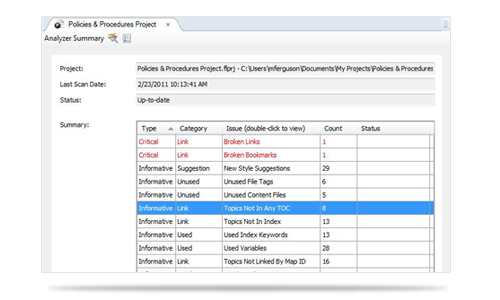
Identify Critical Issues
Immediately find critical issues within a project
that impact end users.
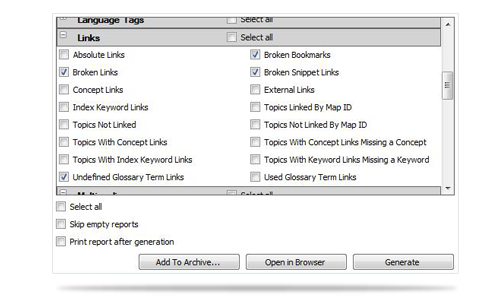
Custom Reporting
Generate reports for just about any type of information captured in Analyzer. You can also design the look and feel of reports, save them for future access, print them, or open them in a browser window.

Visualize Data
Share information with your team and visualize both critical and technical issues with your project, such as broken links or unused content, with charts and graphs to see any statistic at a glance.
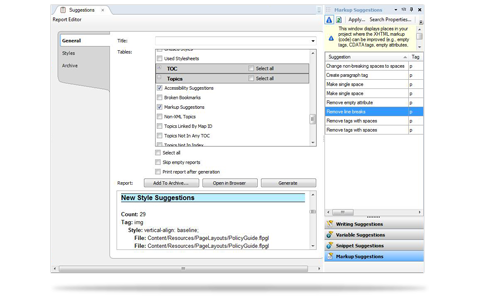
Content Suggestions
Improve content structure and find suggestions for snippets, variables, file tags and more.
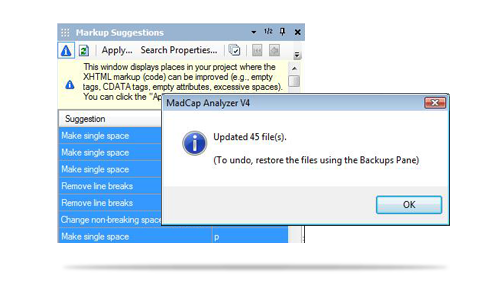
Save Time and Resources
Automate in minutes what would take weeks for a technical editor to identify and ensure content consistency, improve project efficiency and maximize content reuse.
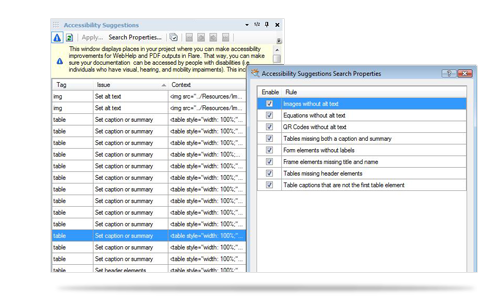
Accessibility
Scan projects and ensure your documentation conforms to accessibility guidelines such as Section 508 and WCAG (Web Content Accessibility Guidelines).
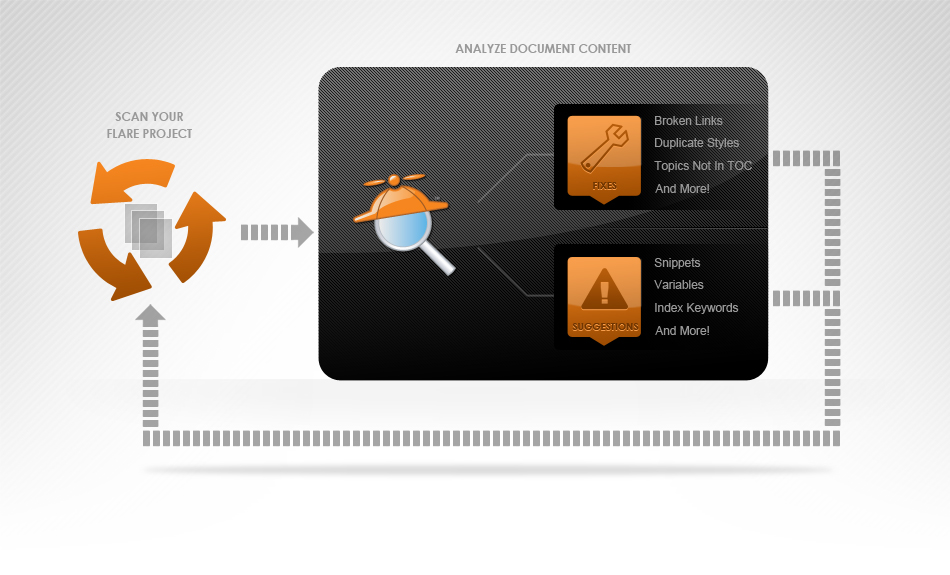
1. Open Your Flare Project
Analyzer scans your project for issues and problems.
2. Locate the Critical Issues
Critical issues in your project are listed on the Analyzer Summary.
3. Review Suggestions and Accept Changes
Review suggestions and determine changes to optimize your project content.
4. Create Reports
Generate any number of reports from the information in Analyzer to share with your team.
Authors
Team Leads
Management
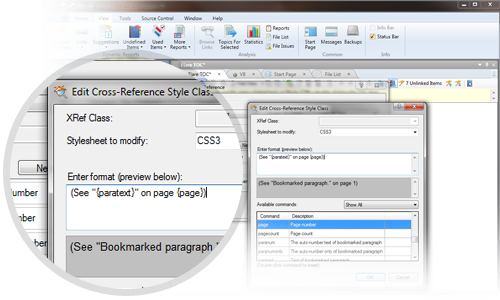
Cross-Reference Suggestions Window Pane
Generate and convert a list links in a project can be converted to cross-references using a new "Cross-Reference Suggestions" window pane.
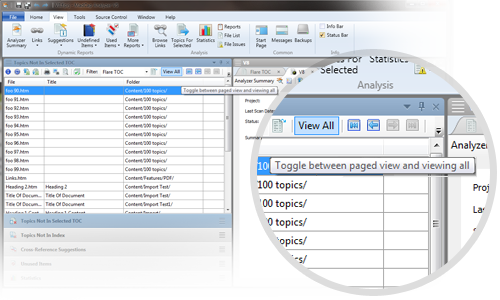
Panes �EViewing Options
Now each window pane has two different options for viewing content �Eview by pages of 100 items, or view all items at once.
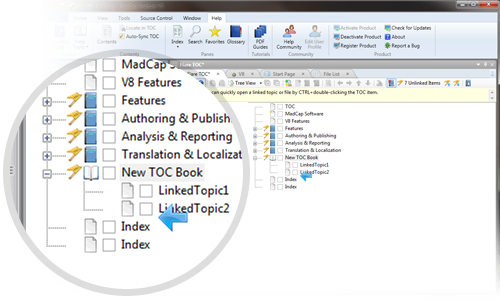
Drag and Drop Topics to TOC
New usability allows you to drag topics from the "Topics Not In Selected TOC" window pane into an open TOC.
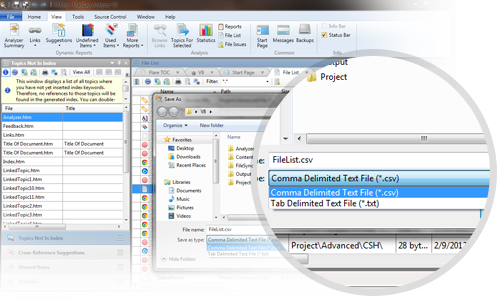
Export Data to a CSV File
You can now export the data from any window pane in Analyzer to a comma-separated value (CSV) file.
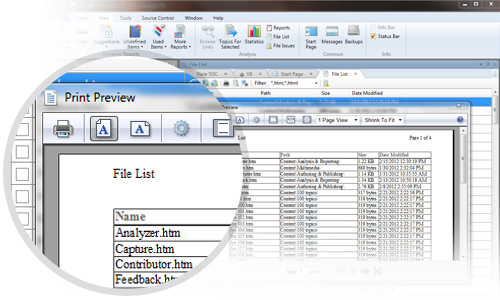
Printing Data from Window Panes
New print features allow you to print data from any window pane in Analyzer, including:
- Print visible area
- Print preview of visible data
- Print report of selected data
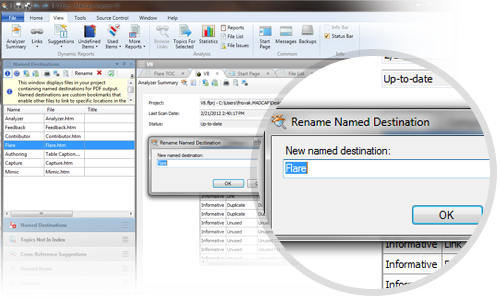
Named Destinations Window Pane
View, delete or rename named destinations in your project in the "Named Destinations" window pane. A named destination lets you point to a specific place in one generated and published PDF to another.
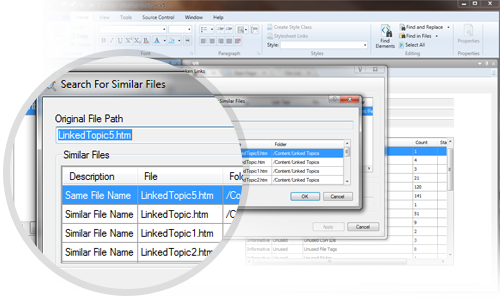
Fix Broken Links
Now fix links directly from the "Broken Links" window pane. Analyzer can scan the project for files of the same name or open a dialog and browse for the topic that you want to link.
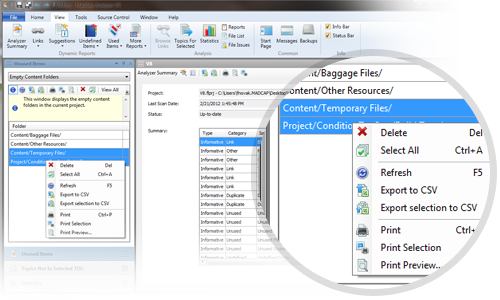
Unused Windows Pane
Clean up projects by scanning for empty project folders, topics that are not linked, or any unused content or images. You can now add condition tags to items in these panes buy right-clicking and selecting properties.
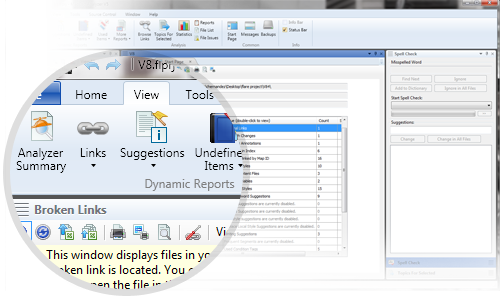
Sleek New UI
A new user interface has been completely redesigned for enhanced authoring and ease of use, featuring ribbons, a Quick Access Toolbar, and more.

- Multiple interface themes (including classic non-ribbon)
- Quick Access Toolbar for personalized buttons
- Keyboard shortcuts for any menu function
- Vastly improved usability and authoring efficiency
- Improved floating and docking for multiple documents and windows
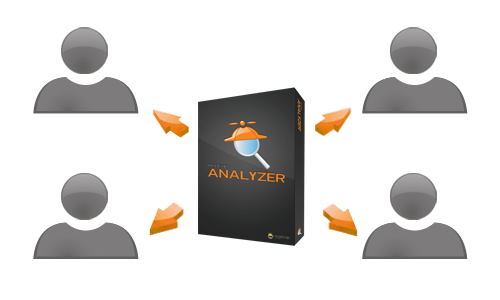
New Subscription, Multi-user Perpetual and Floating/Enterprise Licensing Options
New licensing options mean greater flexibility to fit the unique needs of your organization.
MadCap Analyzer is a powerful, simple to use tool that can improve your project workflow and help you reach project deadlines on time and on budget.
In addition to our standard single named-user perpetual license, we are pleased to offer:
Subscription Licenses
- Currently only available for MadCap Contributor
- 6 months and 12 months subscription available (includes maintenance and support)
- Subscriptions ranging from $8 to $16 per month per user (depending on user total)
Multi-user Perpetual Licenses
- Available for Flare, MadCap Contributor, Analyzer and Capture
- Install software on multiple computers using a single license key
- No registration required for each user
- Completely flexible �Eadd any number of users at any time using the same license key
- No internet connection required (product can still be used when disconnected from internet)
Floating/Enterprise Licenses
- Available for Flare, MadCap Contributor, Analyzer and Capture
- Unlimited installations/activations across company
- Floating license includes bundled maintenance (1-3 year contract �EPlatinum maintenance)
- Completely flexible �Eadd any number of users at any time using the same license key
- Can be installed on a network server and accessed remotely by users
- Internet connection required to use software
MadCap Analyzer V5 What's New Guide >



