日本語 英語 中国語 韓国語
 
SecureZIP Standard Enterprise
  • Application Integration
    • Stream data directly to/from applications without staging data to disk.
check check
  • Encryption via passphrases and/or digital certificates
    • SecureZIP® complements environments using PKI and those that don't by enabling encryption and decryption via passphrases, public key/private key pairs, or both at the same time, depending on the requirements of each intended recipient. SecureZIP supports X.509 RSA v3 certificates issued from recognized certificate authorities such as VeriSign®, Entrust®, Comodo®, and Microsoft®.
check check
  • Digital signatures to verify documents have not been altered
    • SecureZIP enables users to sign files with their unique digital certificates. Recipients of signed files can validate the signature to ensure the sender is who they claim to be and verify that the document has not been altered or tampered with since signing. In addition, digital signatures offer non-repudiation - the signer cannot later claim that the signature is invalid.
check check
  • Contingency key access to protected files
    • SecureZIP's contingency key provides administrative capabilities to ensure that anything secured will be accessible in the event of an audit or for data recovery purposes.
check check
  • File name encryption
    • File name encryption masks file name, file size, and other information to further protect data if it is intercepted in transit or improperly accessed.
check check
  • Error reporting for both attended and unattended operations
    • Windows: SecureZIP reports errors either to the standard Windows® Event Log, or through SNMP (Simplified Network Message Protocol) integration with leading data center management applications.

      UNIX: SecureZIP reports errors either to the standard Syslog, or through SNMP (Simplified Network Message Protocol) integration with leading data center management applications.
check check
  • Email (SMTP) integration
    • Distribution of encrypted files to end-users simply requires adding a switch and the destination email addresses for the recipients, saving processing time and development effort either inside or outside the enterprise.
check check
  • FTP integration
    • FTP integration enables automated delivery of files.
check check
  • Support for smart cards and smart tokens (Windows® only)
    • SecureZIP's support for smart cards and smart tokens enables security professionals to apply an added layer of data protection by storing the user's private decryption key on a small portable device. Smart cards and smart tokens also enable two-factor authentication, requiring the user to present two credentials before he can access protected data - something known and in the user's possession, such as a password and a private key stored on a portable device.
no check
  • Automatic file wiping
    • SecureZIP can be configured to overwrite deleted files - up to seven times in accordance with NSA specifications - to ensure deleted information cannot later be recovered.
check check
  • Automatic access to public keys in directories
    • SecureZIP offers an optional interface that integrates with Lightweight Directory Access Protocol (LDAP) compliant directories, such as Sun® iPlanet, Novell NetWare®, and Microsoft Active Directory®. LDAP integration makes it easy to locate, retrieve, and apply the public keys for certificate-based encryption and decryption.
check check
Note: SecureZIP (PKZIP) Server for Windows is available in Enterprise Edition only. All the enterprise features listed here are included with the product.
SecureZIP for Server Enterprise Edition uses several advanced security features that require a product key. Please call our support team at 1-888-475-9273 to request your product key to complete the evaluation download process.

Thank you!

SecureZIP for Server Enterprise Edition uses several advanced security features that require a product key. Please call our support team at 1-888-475-9273 to request your product key to complete the evaluation download process. Thank you!

Products » SecureZIP » server
SecureZIP® for Server

サーバー向けデータ セキュリティ ソフトウェア


OpenPGP 対応 SecureZIP for Server v14 リリース!
v14 のリリース情報は、こちら (Windows 版Unix/Linix 版) を参照してください。

SecureZIP Server は、ZIP 圧縮処理に強度なセキュリティ機能を追加し、企業の機密データを保護します。管理者にとって、運用が簡単で、貴重なサーバーと管理者のリソースに負担を掛けません。SecureZIP Server は、UNIX®、Linux® および Windows® Server をサポートし、IT マネージャは、データ転送とストレージへの保存を簡素化できます。SecureZIP は、サーバー、zSeries® メインフレーム、iSeries® ミッドレンジおよび Windows デスクトップ間で、安全なファイル転送が可能です。また、一般的な ZIP 圧縮形式をベースとしてるので、SecureZIP は、顧客やパートナーなどの外部の企業ともスムーズにデータ転送ができます。

SecureZIP Server の強度な暗号化は、サーバー上でデータを保護し、更に、バックアップ ファイルと転送ファイルを保護します。SecureZIP では、強力なコマンドラインインターフェースを提供してるので、強度なセキュリティをバックアップのスケジュール化、レポートの配布やファイル転送、ファイルの暗号化、デジタル署名やファイル名の暗号化などの処理をバッチやスクリプト化して自動化したり、既存のアプリケーションに容易に組み込むことができます。コード例はここをクリックしてください。

Enterprise Edition

SecureZIP Server Standard Edition のすべての機能に加え、以下の特長があります。
データ コントロールマスター キー機能で、管理者はサーバー環境内で処理したデータにアクセスできます。
LDAP ディレクトリのサポートSun® Directory Server、Novell eDirectory®、および Microsoft Active Directory® など LDAP (Lightweight Directory Access Protocol) 準拠のディレクトリと統合する追加のインターフェースがあります。LDAP 統合で、証明書ベースの暗号または復号の公開鍵を保存、取得および適用を簡単に実行できます。
注意: SecureZIP for Windows Server は、Enterprise Edition のみとなります。Standard Edition は提供しておりません。

Standard Edition

主要なエンタープライズ向けのすべての OS 間でデータ交換が可能Windows® Desktop、Windows および UNIX®/Linux® サーバー、IBM i® および IBM zSeries® を含む主要なエンタープライズ向けのすべての OS 間で圧縮および暗号化したデータの交換が可能です。
パスワード、公開鍵、または両方を使用してデータを暗号化
アプリケーション統合データをディスクに保存せずにアプリケーションから、またはアプリケーションへデータを直接ストリーム処理します。
最大 95% ファイル サイズを縮小ZIP 圧縮で最大 95% ファイル サイズを縮小し、処理速度を短縮し、貴重なリソースを節約します。
FIPS 140 準拠*FIPS 140-2 準拠の暗号化ライブラリを使用して、コンプライアンスに対応。
* 暗号 2010年問題の対応に関しては、こちらを参照してください。PKWARE 製品は、最新バージョンで FIPS 140 コンプライアンスをサポートし続けます。

SecureZIP in Action

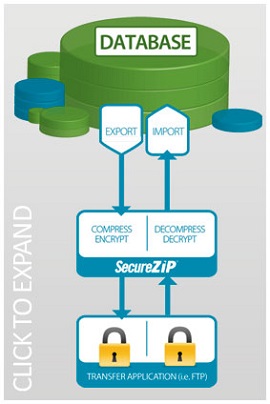
アプリケーション統合アプリケーション統合でセキュリティと処理効率を改良し、データを直接アプリケーションの中と外へストリーム処理します。 暗号化したデータは、復号化したデータをディスクへ書き込まずに処理できます。処理後、データをストリーム処理し、ディスクへ書き込みをせずに暗号化ファイルへ戻すことができます。