日本語 英語 中国語 韓国語
 
SecureZIP Standard Enterprise
  • Microsoft Office® Integration
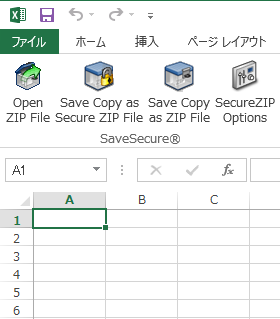
    • Save secure documents directly from Microsoft Office (Word®, Excel®, and PowerPoint®).
check check
  • Custom alternative extensions for mailed .ZIP archives
    • Avoid ZIP archives being blocked by eMail configurations, by creating a custom extension for your .ZIP archives.
check check
  • Microsoft Outlook® Integration
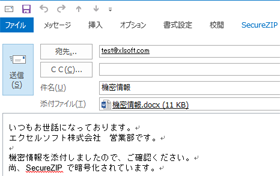
    • Encrypt email and attachments in Outlook.
check check
  • Encryption via passphrases and/or digital certificates
    • SecureZIP® complements environments using PKI and those that don't by enabling encryption and decryption via passphrases, public key/private key pairs, or both at the same time, depending on the requirements of each intended recipient. SecureZIP supports X.509 RSA v3 certificates issued from recognized certificate authorities such as VeriSign®, Entrust®, and Microsoft®.
check check
  • Digital signatures to verify documents have not been altered
    • SecureZIP enables users to sign files with their unique digital certificates. Recipients of signed files can validate the signature to ensure the sender is who they claim to be and verify that the document has not been altered or tampered with since signing. In addition, digital signatures offer non-repudiation - the signer cannot later claim that the signature is invalid.
check check
  • Familiar, easy-to-use interfaces
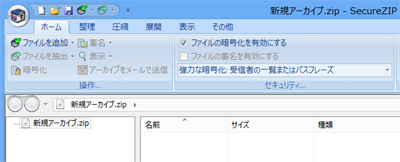
    • SecureZIP makes data protection incredibly easy. Signing and encrypting files are single-click operations. Choose from conventional menu-style, or fluent, ribbon-style interfaces.
check check
  • File name encryption
    • File name encryption masks file name, file size, and other information to further protect data if it is intercepted in transit or improperly accessed.
check check
  • Support for smart cards and smart tokens
    • SecureZIP's support for smart cards and smart tokens enables security professionals to apply an added layer of data protection by storing the user's private decryption key on a small portable device. Smart cards and smart tokens also enable two-factor authentication, requiring the user to present two credentials before they can access protected data - something known and in the user's possession, such as a private key stored on a portable device.
check check
  • Automatic file wiping
    • SecureZIP can be configured to overwrite deleted files up to seven times in accordance with NSA specifications to ensure deleted information cannot later be recovered.
check check
  • Contingency key access to protected files
    • Improperly used encryption can lock an organization out of its own data. SecureZIP ensures organizations are always able to quickly and easily access documents encrypted by their employees.
no check
  • Configurable minimum passphrase length
    • Good passphrases are essential to maintaining the security of your data - the longer the passphrase, the more secure it is. SecureZIP allows administrators to configure the minimum length of passphrases created by users.
check check
  • Certificate revocation list checking
    • SecureZIP can check the validity of digital certificates used for digital signing or encryption against a Certificate Revocation List (CRL). CRL checking will indicate if a certificate is invalid both when users encrypt and sign archives, or decrypt archives and view signatures.
check check
  • Self-extracting files
    • SecureZIP allows users to create PKSFX® self-extracting ZIP files. The benefit of PKSFX files is users can create and transfer files to recipients that do not have ZIP programs on their Windows systems. The recipient simply "clicks" on the file and it automatically decompresses and decrypts the data files. (Licensed for internal use only)
check check
  • LZMA and PPMd Support
    • LZMA and PPMd are increasingly popular general purpose algorithms which can provide increased compression. PPMd support available on 32-bit version only.
check check
  • Administrative lockdown of security settings
    • Designed specifically for the enterprise, SecureZIP allows security professionals to control encryption, digital signature, and other security policies for email attachments based on individual users or workgroups. Corporate policies for protecting intellectual property can be implemented from one central location without relying solely on user discretion.
no check
  • Automatic access to public keys in directories
    • SecureZIP offers an optional interface that integrates with Lightweight Directory Access Protocol (LDAP) compliant directories, such as Sun® iPlanet, Novell NetWare®, and Microsoft Active Directory®. LDAP integration makes it easy to locate, retrieve, and apply the public keys for certificate-based encryption and decryption.
no check
  • FIPS 140 mode
    • Meet FIPS-140 compliance requirements by protecting sensitive data using cryptographic modules.
check check
Products » SecureZIP » Desktop
SecureZIP® for Windows Desktop®

ファイル暗号化ソフトウェア

OpenPGP 対応 SecureZIP for Windows Desktop v14 リリース!
v14 のリリース情報は、こちらを参照してください。

SecureZIP for Windows Desktop は、ハード ドライブ、ノート パソコン、携帯デバイスのデータ ファイルと email の添付ファイルの盗難、改竄または不正アクセスを確実に保護します。SecureZIP を使用して、エンド ユーザーは、強度な暗号化でファイルを保護し、ファイルをデジタル署名することによって、そのファイルが改竄されていないことを証明できます。IT 管理者とセキュリティ専門家はまた、SecureZIP を使用して、組織内のエンド ユーザーに対して、誰が暗号化できるか、できないかをコントロールでき、データをパスワードまたはデジタル証明書を使用して暗号化するかポリシーを設定でき、そして組織内の SecureZIP で暗号化したすべてのファイルへのアクセスを持つことができます。

Standard Edition

あらゆる局面でファイルをセキュアにハード ドライブ、CD または DVD、フラッシュ ドライブ、またはオンライン ストレージ サービスなど、ファイルを保存するあらゆる局面でファイルを保護します。
Microsoft Office 統合 Word、Excel、または PowerPoint から“Save as SecureZIP File”を選択するだけで、直接ファイルを圧縮、暗号化して保存できます。
注意: 本機能は、v12 以降で提供しています。
セキュアな Email と添付ファイルを送信および受信 Microsoft Outlook の統合で、自動的に Email と添付ファイルを暗号化できます。Email と添付ファイルを意図した受信者のみがアクセスできるように確保し、必要に応じて、ファイルをダウンロードおよび再保存せずに暗号化した Email を転送できます。
パスワード、PKI (公開鍵方式)、または両方を使用してファイルを暗号化 SecureZIP では、受信相手のアクセスの必要性に応じて、パスワード ベース (パスフレーズ)、公開鍵/秘密鍵のペア、または 同時に両方を使用して、暗号および復号が可能です。
SecureZIP は、Comodo®、VeriSign®、Entrust®、Microsoft® などの公認の証明書発行機関から発行された X.509 デジタル証明書と OpenPGP をサポートします。
ファイルを圧縮して、ストレージ スペースを節約 最大 95% ファイル サイズを縮小して、機密データを暗号化するので、ストレージ スペースを節約し、ファイル転送の時間を短縮します。
主要なエンタープライズ向けのすべての OS 間でデータ交換が可能 Windows® Desktop、Windows および UNIX®/Linux® サーバー、IBM iSeries® および IBM zSeries® を含む主要なエンタープライズ向けのすべての OS 間で圧縮および暗号化したデータの交換が可能です。
大きいサイズのファイルの圧縮と暗号化 9 エクサバイトを超えるサイズのファイルを圧縮し暗号化します。
パスワード長の最小値を変更可能 データのセキュリティの強度を維持するには、パスワード長は重要な要素となります - パスワード長が長ければ、セキュリティの高度が上がります。SecureZIP では、管理者によって、 パスワード長の最小値を設定することができます。
データの整合性 デジタル署名でデータの整合性を確保します。
自己解凍形式ファイル (SFX) の作成 自己解凍形式の ZIP ファイル (PKSFX®) を作成可能です。
注意: SFX ファイルの作成機能は、社内使用に限られています。生成した SFX ファイルを商用で社外へ配布する場合には、別途、SFX 配布ライセンスが必要です。
ファイル名の暗号化 SecureZIP アーカイブ内のファイル名を暗号化すると、アーカイブを復号するまでファイル名を読みことはできません。
ロスレス圧縮 (可逆圧縮) SecureZIP はロスレス圧縮を使用してるので、ファイルを ZIP する際に、オリジナル データの欠落がありません。
多くの圧縮・解凍方式に対応 ZIP、TAR、JAR、BZIP2、GZIP、UUEncode、LZMA、PPMd、XXEncode、OpenPGP、TAR BZIP2 および TAR GZIP を含む複数の圧縮方式を作成可能です。
ZIP、RAR、TAR、JAR、BZIP2、GZIP、UUEncode、XXEncode、CAB、LZH、ARJ、LZMA、PPMd、BinHex、OpenPGP、TAR BZIP2、TAR GZIP、7Zip、CDR、compress (UNIX、LZW)、IMG および ISO の圧縮方式を解凍可能です。
注意: PPMd および LZMA ファイル フォーマットは v12.4 以降でサポートしています。
OpenPGP、7Zip ファイル フォーマットは v14 以降でサポートしています。
スマート カードとスマート トークンのサポート スマート カードとスマート トークンのサポートで、 携帯デバイスに秘密暗号鍵や強度なパスワードを格納することによって、 データ保護のレイヤを追加し、セキュリティの強度を高めます。
ファイルの自動削除 を削除したファイルを上書きするように設定することができます - NSA 仕様では、7 回まで - 削除した情報を後で復元できないようにするため。

Enterprise Edition

SecureZIP for Windows Standard Edition のすべての機能に加え、以下の特長があります。
デジタル証明書 200 ユーザーまで、ご購入いただいたライセンス数分のデジタル証明書が含まれます。200 ユーザー以上の場合には、お問い合わせください。
注意: 本オプションは、v14 以降で提供しています。
データ コントロール マスター キー機能で、管理者はデスクトップ環境内で処理したデータにアクセスできます。
組織のセキュリティ ポリシーを施行 ポリシー マネージャ機能で管理者は、組織の要件や運用に応じて、セキュリティ ポリシーを強制することができます。
共通ディレクトリに保存した証明を自動的に配置、取得および使用 LDAP ディレクトリのサポートで、Sun® iPlanet、Novell Netware®、および Microsoft Active Directory® など、共通ディレクトリに保存した証明書を自動的に配置、取得および使用できます。

SecureZIP in Action

Microsoft Office 統合
»

SecureZIP を Microsoft Office に統合して、ドキュメントの生成時に、セキュアなファイルとして保存します。
Email 統合
»

SecureZIP は、Microsoft Outlook とシームレスに統合します。
使いやすいインターフェース
»

SecureZIP にファイルをドラッグ アンド ドロップするだけで暗号化および圧縮できます。


SecureZIP integrates with Microsoft Office

SecureZIP integrates with Microsoft Outlook

SecureZIP integrates with Microsoft Office