In a recent blog post titled “[Warning]The Largest npm Software Supply Chain Attack in History: Shai-Hulud ~ Over 20 Malicious OSS Packages Downloaded 2 Million Times in One Week” we summarized the damage to organizations caused by npm package downloads. This time, as a practical follow-up, we have compiled the countermeasures.
For countermeasures against this issue, please feel free to contact XLsoft or the author of this document, Alex Wang (王 子龍), at https://jfrog.com/ja/platform/schedule-a-demo/ (available in both Japanese and English).
JFrog Curation is a solution that automatically detects and blocks malicious packages and high-risk components “before” open source software (OSS) enters the internal development environment.
Whereas conventional security measures (such as Xray) “scan what has already come in,” Curation plays the role of “turning things away at the front gate.”
It is positioned as “0” in the diagram below.
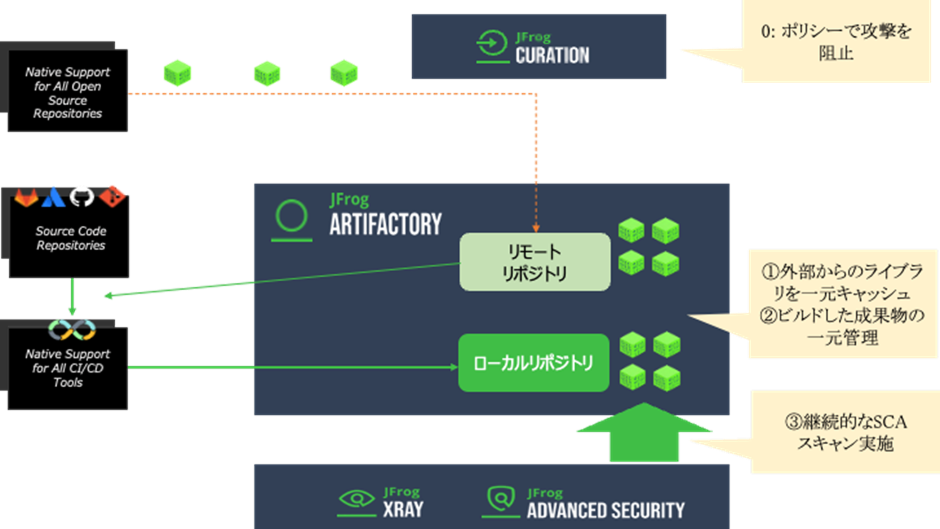
- The Main Mechanisms of JFrog Curation
- Now, Let’s Give It a Try.
- Step 1: Creating a Remote Repository for OSS Caching
- Step 2: Specifying the Repository in GitHub YAML
- Step 3: Enabling Curation and Creating a Policy
- Step 4: Using GitHub Actions to Run the Build and Cache
- Step 5: As an Organization Administrator, Monitor Organization-Wide Security in the JFrog Curation Dashboard, Achieving Both Security Governance and Improved Development Speed
The Main Mechanisms of JFrog Curation
1. Real-Time Metadata Verification at Request Time
When a developer runs commands such as npm install or pip install and requests a package via JFrog Artifactory (remote repository), Curation intercepts that request.
- Utilizing Binaries and Metadata: Before downloading and scanning the package itself, judgment is made based on the metadata in the repository. This allows for fast processing without wasting download time.
- Integration with JFrog Catalog: It cross-references the metadata of JFrog’s vast OSS catalog and instantly reflects the latest security information.
2. Policy-Based Automatic Blocking
Administrators can flexibly set policies for “what kind of packages to reject” according to the organization’s standards.
- Malicious Packages: Immediate blocking of malware and typosquatting (attacks targeting misspellings of names).
- Vulnerabilities (CVE): Blocking packages with vulnerabilities above a specified score (CVSS).
- License Compliance: Detecting licenses not permitted by the organization (e.g., GPL, etc.).
- Operational Risk: Restricting packages whose maintenance has stopped (the project is dead), or that have just been released and have low reliability.
3. Thorough “Shift Left” and Developer Productivity
By incorporating security at an extremely early stage of the development process (at the time of package acquisition), rework at later stages is prevented.
- Suggesting Alternative Versions: When a specific version is blocked, there is a function that automatically suggests the latest “safe version” that complies with the policy.
- Dry Run (Simulation): Before deploying a policy in production, you can simulate how much impact it will have on the current development flow, preventing unintended blocks.
- Audit Trail: A full history of who requested which package, when, and why it was blocked is recorded, allowing you to prove compliance adherence.
Now, Let’s Give It a Try.
As a demo scenario, we will cache lodash 4.17.7, which has a CVE vulnerability, via a Remote Repository. Then, we will execute a block or approval process (Dry Run) using Curation.
Step 1: Creating a Remote Repository for OSS Caching
- Click Administration → Create a Repository → Remote Repository.
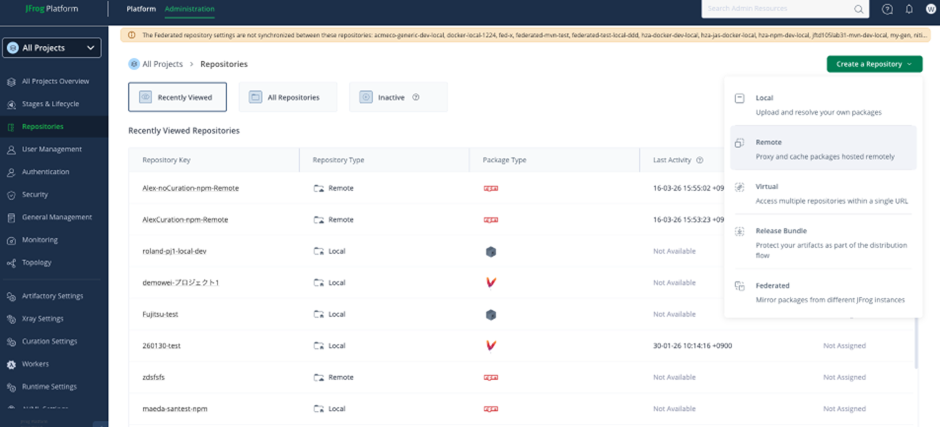
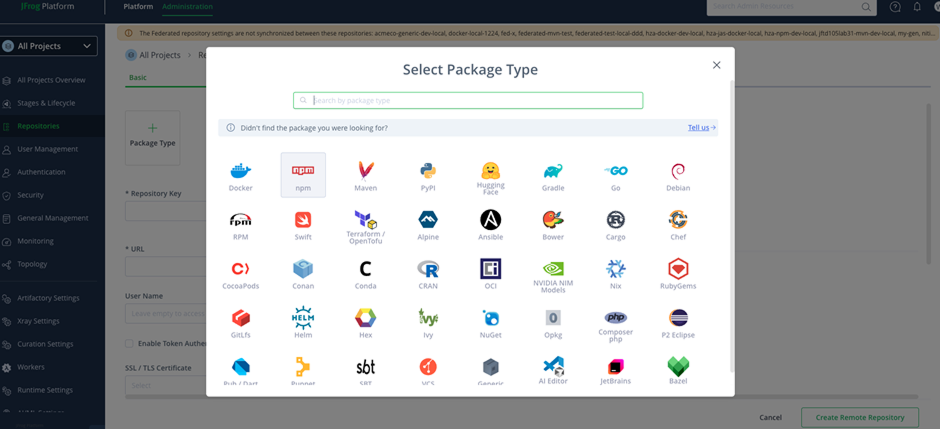
- Select the applicable package type. This time, it is npm.
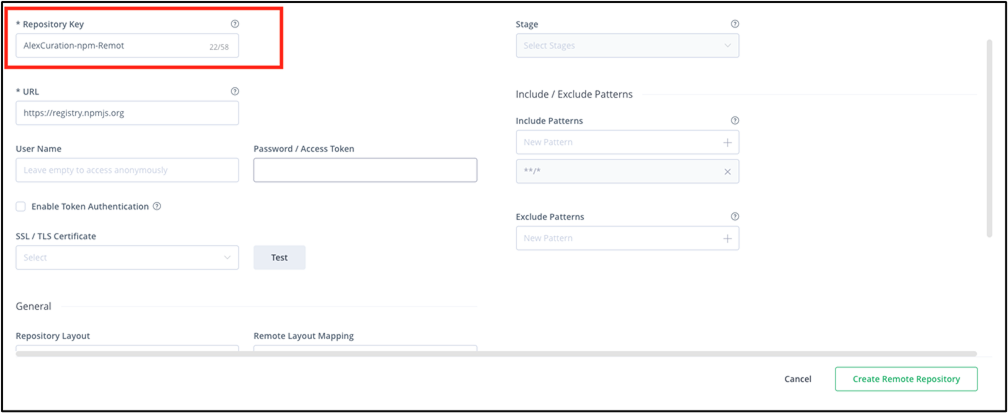
- Enter the Repository Key (repository name) and click “Create Remote Repository” to save. This time, we created a repository named “AlexCuration-npm-Remote.”
Step 2: Specifying the Repository in GitHub YAML
name: npm build via JFrog AlexCuration (OIDC)

on:
  push:
    branches: [ main ]

# Permissions required for OIDC authentication
permissions:
  id-token: write
  contents: read

jobs:
  build:
    runs-on: ubuntu-latest

    steps:
      - name: Checkout code
        uses: actions/checkout@v4

      - name: Setup Node.js
        uses: actions/setup-node@v4
        with:
          node-version: '20'

      # Setup JFrog CLI and run OIDC authentication
      - name: Setup JFrog CLI
        uses: jfrog/setup-jfrog-cli@v4
        env:
          JF_URL: ${{ secrets.JF_URL }}
          # Match this to the provider name configured on the JFrog side
          JF_OIDC_PROVIDER_NAME: github-oidc-provider
        with:
          oidc-provider-name: ${{ env.JF_OIDC_PROVIDER_NAME }}

      # Auto-generate .npmrc with the specified remote repository as the resolution target
      - name: Configure npm to use AlexCuration-npm-Remote
        run: |
          jf npm-config --repo-resolve=AlexCuration-npm-Remote

      # Install via JFrog (GitHub Actions cache is not used)
      # Using jf npm install records build information on the JFrog side
      - name: Install dependencies
        run: jf npm install

      - name: Run build
        run: npm run build --if-present
Step 3: Enabling Curation and Creating a Policy
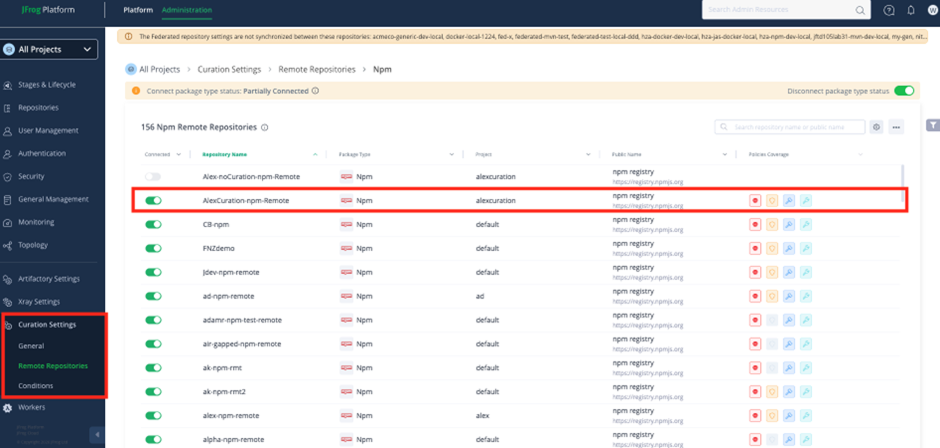
- Go to Administration → Curation Settings → Remote Repositories → npm → and enable the Connected button for the applicable Remote Repository (“AlexCuration-npm-Remote”).
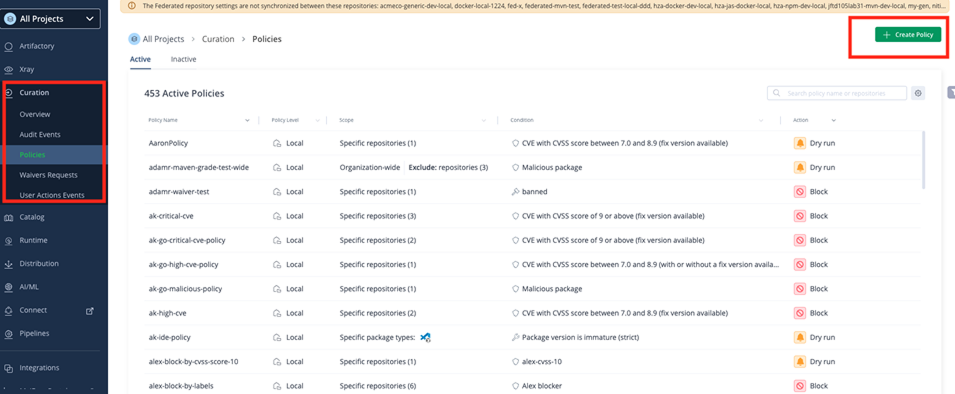
- Proceed in the order of Platform → Curation → Create Policy to create a new policy.
- Set the Policy Name as desired.
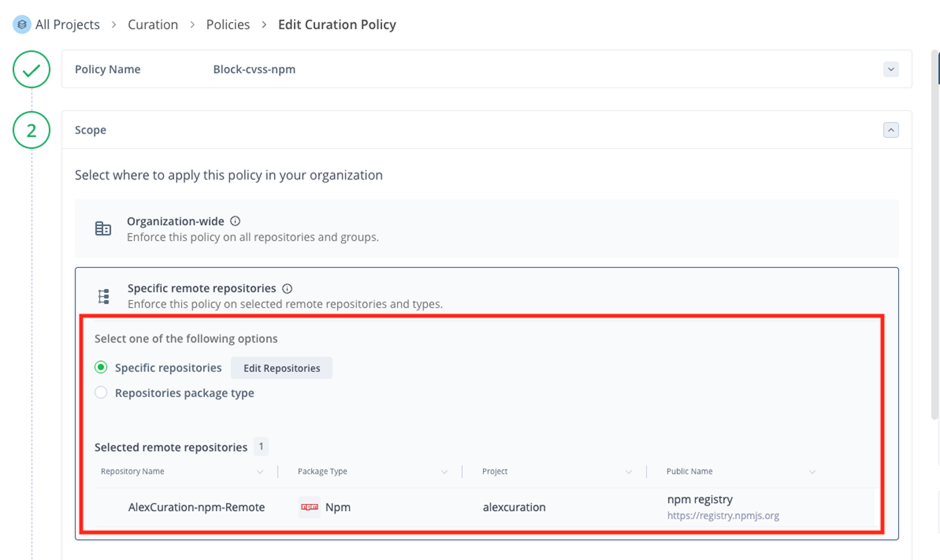
In Scope, you can choose whether to apply it to all Remote Repositories with “Organization-Wide,” or to only specific repositories with “Specific Remote Repositories.” For this test, we selected only the “AlexCuration-npm-Remote” repository created above.
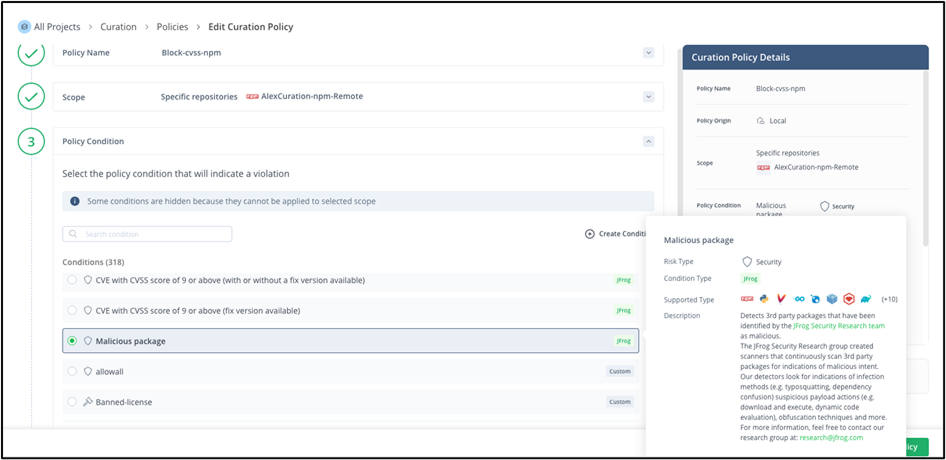
- Next, set the policy conditions in Policy Condition. For example, by checking “Malicious Package,” you can block malicious packages.
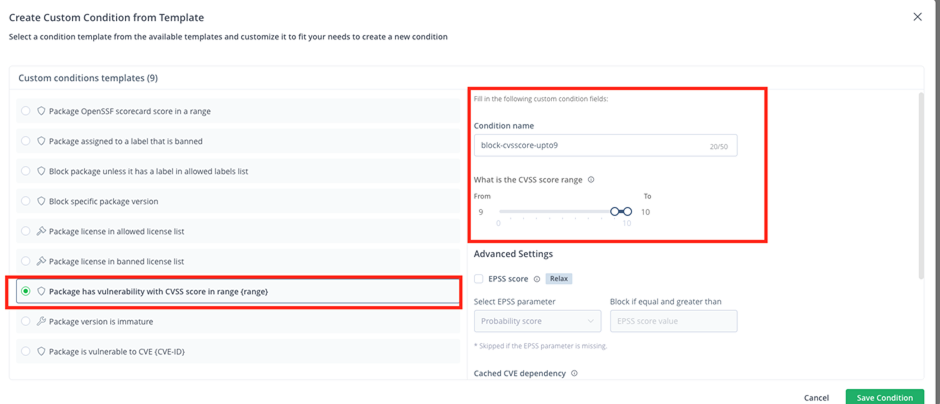
- Furthermore, clicking the “Create Condition” button allows for more detailed settings. For example, if you want to block CVEs with a CVSS score of 9.0 or higher, you can narrow it down with “Package has vulnerability with CVSS score in range.”
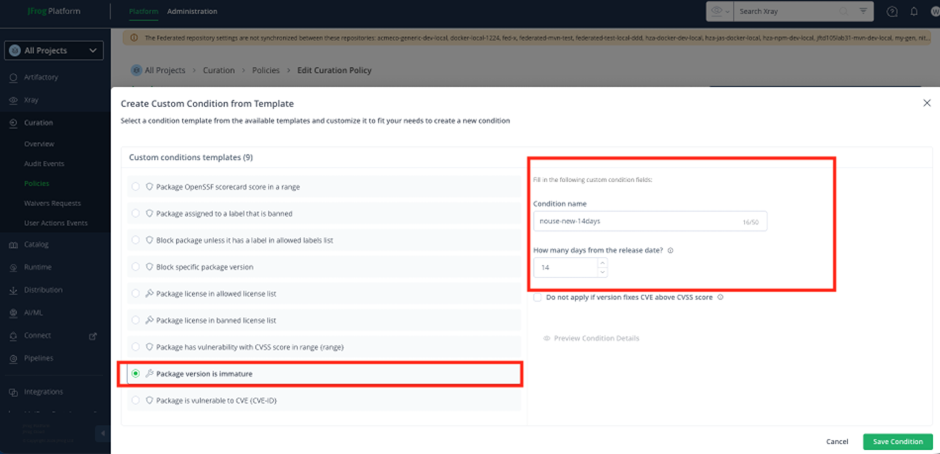
- Also, by using “Package version is immature,” you can control the release date of packages used. By entering 14 in “How many days from the release date?”, you can set up governance that restricts the use of packages within 14 days of being released to the community.
- If this rule is violated, you can choose whether to block it or execute a Dry Run (approval flow). This time, we set it to block. Finally, clicking “Save Policy” applies the created policy.
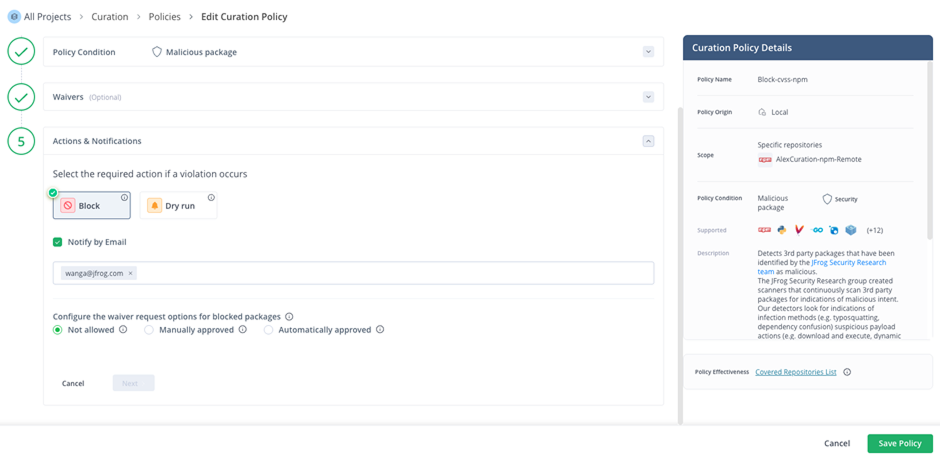
This time, we are only introducing some of the features.
For more detailed settings, please refer to the official Curation configuration manual: JFrog Curation Official Manual
Step 4: Using GitHub Actions to Run the Build and Cache
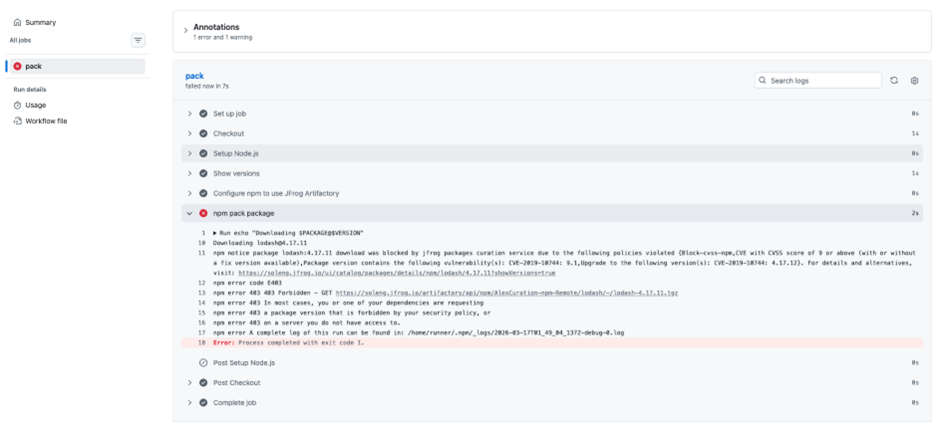
When you run the build and cache, the download of packages that match the JFrog Curation policy is blocked, and a 403 error occurs.
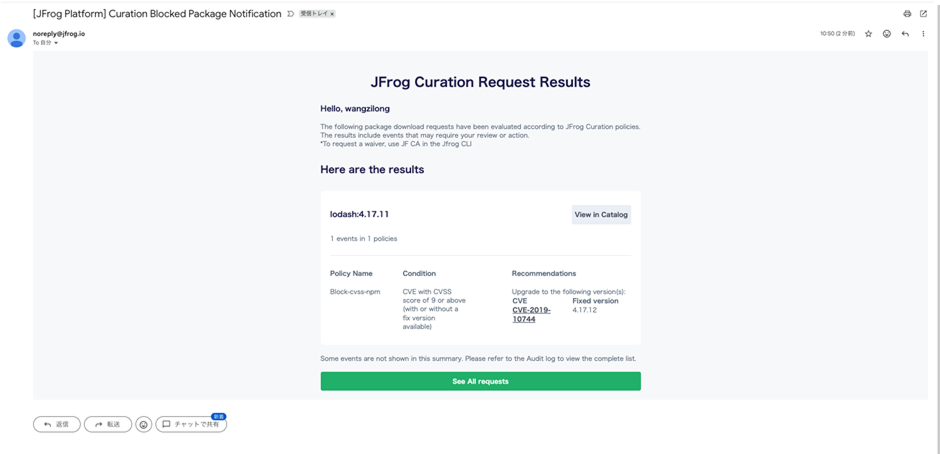
At the same time, you will receive an email stating: “The version of lodash you tried to use, 4.17.11, has a very dangerous security hole (CVE-2019-10744), so its use has been prohibited by company policy. Please upgrade to a safe version of 4.17.12 or higher. As the next step you should take, open package.json (or your project’s dependency management file), rewrite the lodash version to 4.17.12 or later (the latest is 4.17.21, etc.), and try installing again.”
There are the following three benefits for developers and organizations:
Preventing Fatal Cyberattacks
The detected CVE-2019-10744 is at the “critical” level, with a CVSS (vulnerability severity) of 9.0 or higher. Simply by following this notification and updating, you can eliminate the risk of external unauthorized operations and data leaks without writing a single line of code.
Compliance and Governance Adherence
In corporate environments, leaving vulnerable libraries unattended becomes a risk in security audits. By being automatically blocked and notified by JFrog Curation, the entire development team can maintain a clean state where “only safe code enters the build environment.”
Reducing Operational Costs
The later a serious vulnerability is discovered, the more the remediation costs (patching, retesting, deployment, post-incident reporting, etc.) balloon. By receiving a notification and fixing it at the very “moment” you try to download it, you can minimize the time spent on future troubleshooting.
Incidentally, this vulnerability is called “Prototype Pollution,” and it is an extremely serious one that allows attackers to hijack the application’s behavior or cause it to crash.
Step 5: As an Organization Administrator, Monitor Organization-Wide Security in the JFrog Curation Dashboard, Achieving Both Security Governance and Improved Development Speed
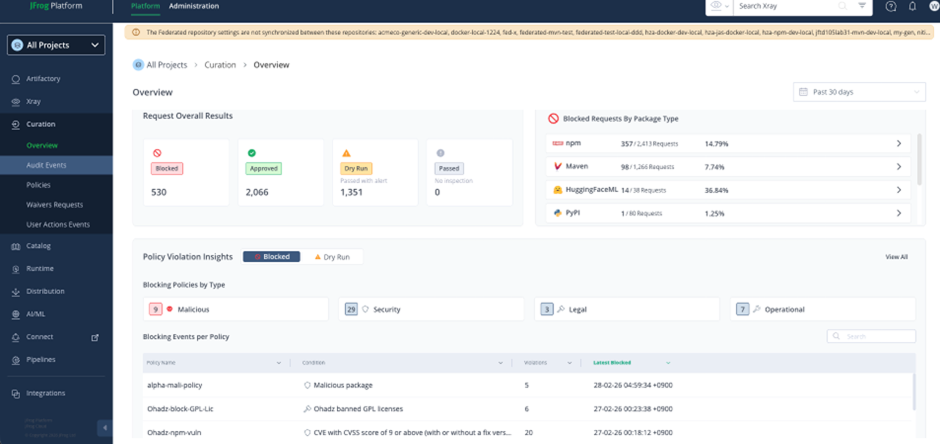
The specific benefits are as follows:
“Visualization” and “Immediate Grasp” of Security Risks
The biggest benefit is being able to understand in real time “what is causing how much development to be halted right now.”
- Request Overall Results: You can see at a glance the number of blocked requests (530 cases) and the number of cases where warnings were issued in Dry Run (test operation).
- Blocking Policies by Type: You can instantly identify which risk is most common across the four categories of “Malicious Packages,” “Security Vulnerabilities (Security),” “License Violations (Legal),” and “Operational Rule Violations (Operational).”
Minimizing the Impact on Development Speed
Rather than developers individually investigating vulnerabilities, the platform side automatically makes judgments, increasing the efficiency of the entire organization.
- Blocked Requests By Package Type: You can grasp trends in which ecosystems, such as npm or Maven, are prone to blocking. For example, strategic decisions become possible, such as “Since npm’s block rate is high at 14.79%, let’s review the dependency update rules.”
- Utilizing Dry Run Mode: Since you can simulate “what would happen if this policy were applied” before actually blocking, you can introduce new security rules without disrupting the development site.
Automatic Enforcement of Compliance and Governance
Rather than a manual checklist, the system automatically fulfills the role of “gatekeeper.”
- Automatic Policy Application: As shown in the list at the bottom, rules such as “GPL licenses are prohibited (Legal)” and “vulnerabilities with CVSS 9 or higher are blocked (Security)” can be applied consistently to all projects.
- Audit Trail (Audit): Since a history of when, who, and which package was attempted to be downloaded and rejected remains, audit response becomes very smooth.
Ensuring the Safety of AI/ML Models (HuggingFace Support)
A notable point of this dashboard is that it includes the HuggingFaceML item.
- Since censorship can be applied not only to conventional libraries but also to AI model downloads, in the modern era where AI utilization is advancing, you can prevent “malicious models” from sneaking into the company.
The above are the practical steps for software supply chain countermeasures using JFrog Curation.
Author of This Article ~ Alex Wang (王 子龍) JFrog Japan
During my time as a strategy consultant, I led projects in agile and DevOps coaching for industries such as IT, automotive, and manufacturing, including development environment setup and CI/CD implementation. Currently, I am working to expand and promote DevSecOps and the latest overseas software development security measures in Japan.
Linked-in: https://www.linkedin.com/in/alex-wang-662290150/
- EXIN DevOps Professional
- PMI Project management Professional
- PCI・DSS Japan member
- Aoyama Gakuin University MBA holder

For questions about JFrog, please contact XLsoft, the authorized distributor in Japan.
This article has been created and published with permission from JFrog.
Click here to subscribe to the email newsletter from XLsoft, which provides popular software from around the world.